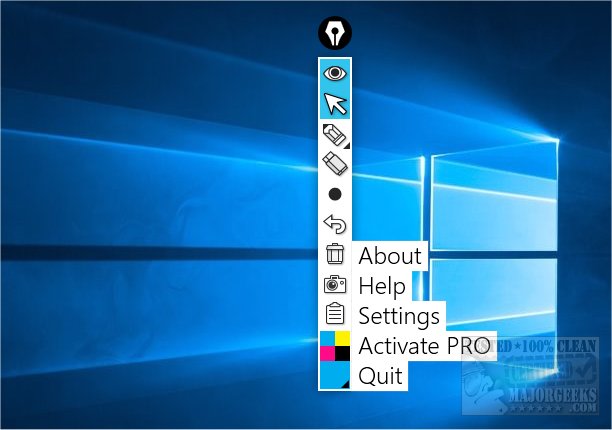
Epic Pen version 3.12.172 has been released, offering users a versatile tool to write and draw directly over any software on Windows. This digital whiteboard and screen marker tool features a convenient toolbar that overlays other applications, allowing for easy access to essential functions such as cursor selection, pen and eraser tools, adjustable pen sizes, undo options, and a clear screen feature. Additionally, Epic Pen includes a screenshot function, facilitating quick captures of on-screen content.
The software is designed for simplicity, making it user-friendly for individuals who want to enhance their presentations or notes. Users can start drawing over applications like Google Chrome within minutes of installation, as demonstrated in the provided screenshots.
Epic Pen operates on a freemium model, where the basic features are available for free, while premium features can be unlocked through purchase. The paid version includes tools like a Line Tool, Text Tool, Whiteboard, Blackboard, and a Vibrant Color pack, which enhance the functionality for professional and educational purposes.
Overall, Epic Pen is an excellent tool for anyone looking to add a creative touch to their digital interactions, whether for teaching, presentations, or personal use. It stands out for its ease of use and the robust set of features that cater to a wide range of users.
In addition to its primary functionalities, users may also find it useful to explore related guides, such as restoring the Windows Photo Viewer in Windows 10 and 11, or creating a Screen Snip shortcut for faster access to screenshot capabilities
The software is designed for simplicity, making it user-friendly for individuals who want to enhance their presentations or notes. Users can start drawing over applications like Google Chrome within minutes of installation, as demonstrated in the provided screenshots.
Epic Pen operates on a freemium model, where the basic features are available for free, while premium features can be unlocked through purchase. The paid version includes tools like a Line Tool, Text Tool, Whiteboard, Blackboard, and a Vibrant Color pack, which enhance the functionality for professional and educational purposes.
Overall, Epic Pen is an excellent tool for anyone looking to add a creative touch to their digital interactions, whether for teaching, presentations, or personal use. It stands out for its ease of use and the robust set of features that cater to a wide range of users.
In addition to its primary functionalities, users may also find it useful to explore related guides, such as restoring the Windows Photo Viewer in Windows 10 and 11, or creating a Screen Snip shortcut for faster access to screenshot capabilities
Epic Pen 3.12.172 released
Epic Pen lets you write and draw over any software. It's a screen marker and digital whiteboard tool for Windows.