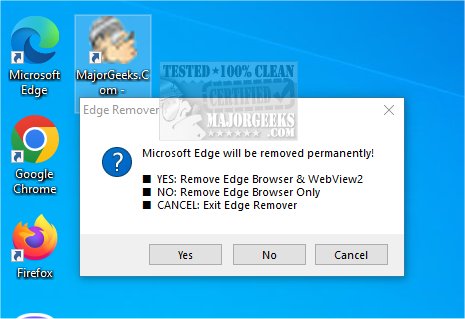
Edge Remover 19.00 has been released, providing a straightforward solution for users looking to uninstall Microsoft Edge and WebView2 from their computers. This utility streamlines the removal process into two simple options: users can choose to remove both the Edge Browser and WebView2, or just the Edge Browser itself. The application operates without a graphical user interface, presenting a single popup window to select the desired removal option, after which it executes the task and closes immediately.
While Edge Remover effectively serves its primary purpose of uninstalling Edge Browser, it currently lacks features for clearing associated data, such as cached files or user settings. This limitation may be a concern for some users who want to ensure that not only the browser is removed but also any remnants of its data. To enhance its functionality, future versions of Edge Remover could benefit from the addition of options for comprehensive data removal, ensuring a clean slate for users who wish to eliminate all traces of Microsoft Edge from their systems.
Overall, Edge Remover is a valuable tool for those seeking a quick and efficient way to uninstall Microsoft Edge Browser, though it would be even more useful with expanded capabilities for data management.
In addition to Edge Remover, users may find it helpful to explore related resources such as guides on uninstalling programs not listed in the Control Panel, clearing browsing data when Edge is closed, and changing default search engines in Edge. These resources can provide further assistance in managing browser settings and optimizing user experience
While Edge Remover effectively serves its primary purpose of uninstalling Edge Browser, it currently lacks features for clearing associated data, such as cached files or user settings. This limitation may be a concern for some users who want to ensure that not only the browser is removed but also any remnants of its data. To enhance its functionality, future versions of Edge Remover could benefit from the addition of options for comprehensive data removal, ensuring a clean slate for users who wish to eliminate all traces of Microsoft Edge from their systems.
Overall, Edge Remover is a valuable tool for those seeking a quick and efficient way to uninstall Microsoft Edge Browser, though it would be even more useful with expanded capabilities for data management.
In addition to Edge Remover, users may find it helpful to explore related resources such as guides on uninstalling programs not listed in the Control Panel, clearing browsing data when Edge is closed, and changing default search engines in Edge. These resources can provide further assistance in managing browser settings and optimizing user experience
Edge Remover 19.00 released
Edge Remover is a super-simple option for removing Microsoft Edge and WebView2 from your PC.