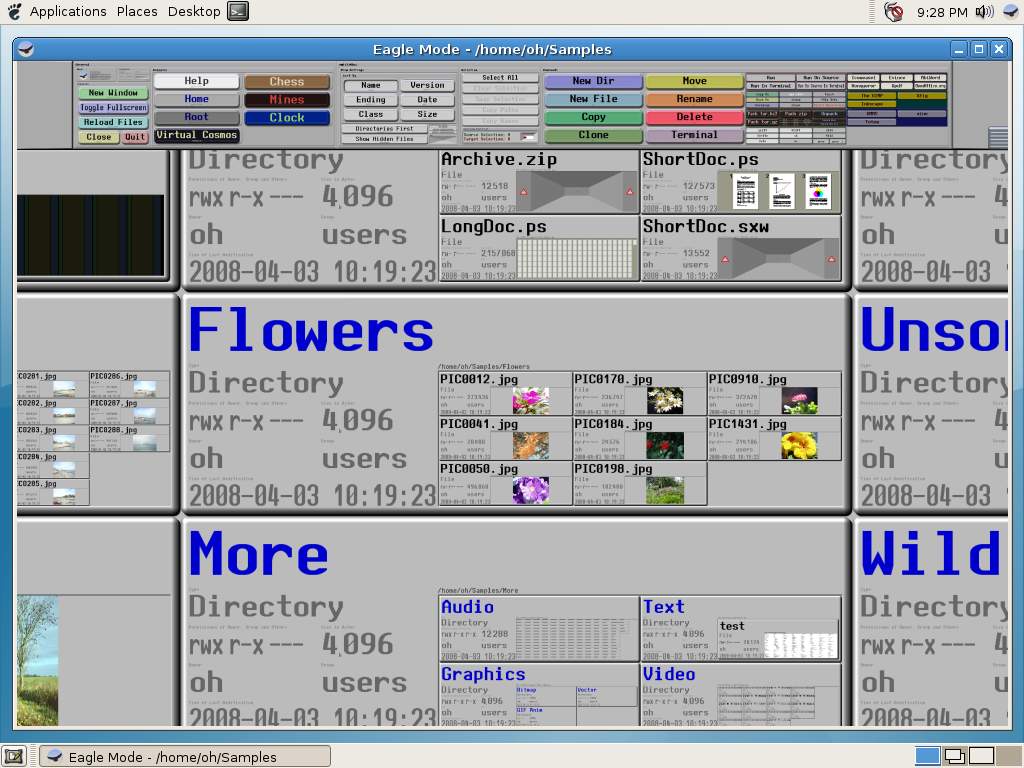
Eagle Mode has released version 0.96.4, introducing an innovative approach to man-machine interaction through its unique zoomable user interface. Users can explore a virtual cosmos by zooming in on various features, which include a professional file manager, file viewers and players for common file types, games such as chess and 3D mine sweeper, a multifunctional clock, and fractal generation tools. Additionally, it offers a Linux kernel configuration through a kernel patch, enhancing its functionality.
Eagle Mode is designed to be at the forefront of user interface technology, providing features like help texts that describe the elements, editable bookmarks, diverse input methods, fast anti-aliased graphics, and an extensive panel tree. Its architecture supports a portable C++ API, allowing developers to create both plugin and standalone applications. Plugin applications can integrate into the virtual cosmos and the file manager, while standalone applications operate in their own desktop windows.
The Windows version of Eagle Mode is a lighter iteration compared to the Linux version, featuring fewer plugins and commands, and handling fewer files at once.
To further enhance the user experience, users can explore related topics such as managing storage, controlling startup applications, and utilizing PowerShell to remove built-in apps in Windows 10 and earlier versions.
In summary, Eagle Mode 0.96.4 represents a significant advancement in interactive computing, providing users with a powerful, versatile tool for file management and entertainment, while also catering to developers through its extensible API. The platform's unique approach to user interaction and its rich feature set position it as a valuable resource for both casual users and tech enthusiasts alike
Eagle Mode is designed to be at the forefront of user interface technology, providing features like help texts that describe the elements, editable bookmarks, diverse input methods, fast anti-aliased graphics, and an extensive panel tree. Its architecture supports a portable C++ API, allowing developers to create both plugin and standalone applications. Plugin applications can integrate into the virtual cosmos and the file manager, while standalone applications operate in their own desktop windows.
The Windows version of Eagle Mode is a lighter iteration compared to the Linux version, featuring fewer plugins and commands, and handling fewer files at once.
To further enhance the user experience, users can explore related topics such as managing storage, controlling startup applications, and utilizing PowerShell to remove built-in apps in Windows 10 and earlier versions.
In summary, Eagle Mode 0.96.4 represents a significant advancement in interactive computing, providing users with a powerful, versatile tool for file management and entertainment, while also catering to developers through its extensible API. The platform's unique approach to user interaction and its rich feature set position it as a valuable resource for both casual users and tech enthusiasts alike
Eagle Mode 0.96.4 released
Eagle Mode is an advanced solution for a futuristic style of man-machine communication in which the user can visit almost everything simply by zooming in.