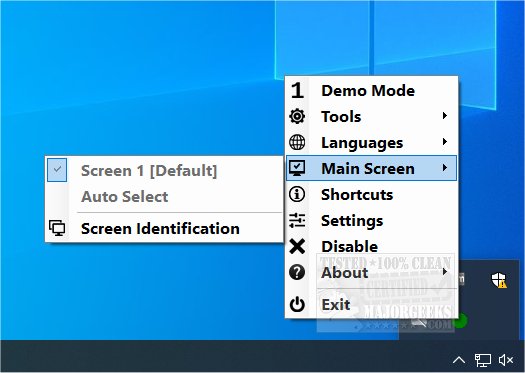
The latest version of Dual Monitor Auto Mouse Lock, 1.0.0.11, is now available. This portable application is designed to enhance user experience in dual-monitor setups by confining the mouse pointer to a selected monitor, particularly when a foreground window is displayed in full-screen mode. By restricting the cursor's movement, the app aims to prevent accidental cursor roaming, thereby providing users with greater control over their workspace.
Key Features:
- Systray Integration: The application operates from the system tray, allowing for easy access to settings. Users can alter various appearance options, including color schemes for the app's status indicators—Green for unlocked, Red for locked, Blue X for paused, and Red X for disabled.
- Customizable Notifications: Users can enable sound alerts for changes in app status, enhancing the interactive experience.
- User-Centric Design: The interface is intuitive and straightforward, making it easy for users of all skill levels to navigate and utilize the application efficiently.
- Main Screen Management: Upon its first launch, Dual Monitor Auto Mouse Lock identifies the main screen as set by Windows and locks the cursor accordingly. Users have the flexibility to change which screen is designated as the main one and can also exclude specific applications from being affected by the mouse lock feature.
- Visual Customization: The app offers options for modifying the appearance of the systray icon, including color changes and icon shape adjustments. Additionally, a dark theme is available for users who prefer a more subdued interface.
Extended Applications:
Dual Monitor Auto Mouse Lock can be particularly beneficial in a variety of scenarios, such as gaming, graphic design, programming, and multitasking with multiple applications. By allowing users to concentrate on one screen without distractions from the other, it enhances productivity and focus. Furthermore, the ability to customize settings enables users to tailor their experience based on personal preferences and work habits.
In summary, Dual Monitor Auto Mouse Lock 1.0.0.11 is a valuable tool for those who utilize dual monitors, providing essential features for managing mouse control and enhancing user experience
Key Features:
- Systray Integration: The application operates from the system tray, allowing for easy access to settings. Users can alter various appearance options, including color schemes for the app's status indicators—Green for unlocked, Red for locked, Blue X for paused, and Red X for disabled.
- Customizable Notifications: Users can enable sound alerts for changes in app status, enhancing the interactive experience.
- User-Centric Design: The interface is intuitive and straightforward, making it easy for users of all skill levels to navigate and utilize the application efficiently.
- Main Screen Management: Upon its first launch, Dual Monitor Auto Mouse Lock identifies the main screen as set by Windows and locks the cursor accordingly. Users have the flexibility to change which screen is designated as the main one and can also exclude specific applications from being affected by the mouse lock feature.
- Visual Customization: The app offers options for modifying the appearance of the systray icon, including color changes and icon shape adjustments. Additionally, a dark theme is available for users who prefer a more subdued interface.
Extended Applications:
Dual Monitor Auto Mouse Lock can be particularly beneficial in a variety of scenarios, such as gaming, graphic design, programming, and multitasking with multiple applications. By allowing users to concentrate on one screen without distractions from the other, it enhances productivity and focus. Furthermore, the ability to customize settings enables users to tailor their experience based on personal preferences and work habits.
In summary, Dual Monitor Auto Mouse Lock 1.0.0.11 is a valuable tool for those who utilize dual monitors, providing essential features for managing mouse control and enhancing user experience
Dual Monitor Auto Mouse Lock 1.0.0.11 released
Dual Monitor Auto Mouse Lock is a portable app that allows you to confine your mouse pointer to the monitor of your choice.