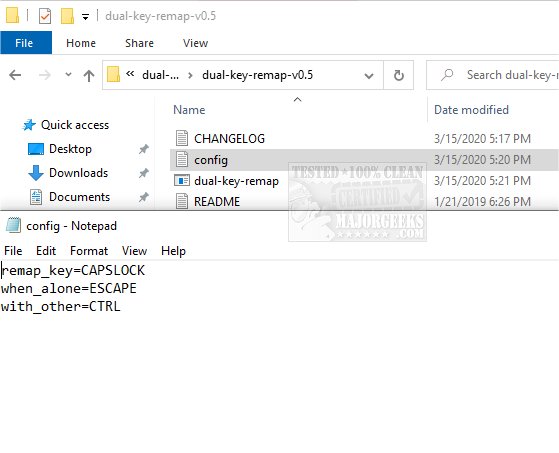
The recently released Dual Key Remap 0.10 is a portable and open-source application designed for remapping any single key to two different keys. This tool is particularly useful for users who want to change the functionality of the CapsLock key to serve as the Escape key when pressed alone and as the Control key when used in combination with other keys. It can be invaluable for individuals dealing with malfunctioning keys, especially on laptops where the failure of a key can significantly impede productivity.
Users can easily view key mappings by referencing the application's wiki, which provides detailed information about its functionalities. However, it is important to note an unusual exit method: users must terminate the application via the Task Manager to restore the original key functions.
Dual Key Remap boasts several features, including a low CPU usage, efficient input handling without interference, and the ability to manage edge cases smoothly. For those interested in similar functionality, there are other resources available, such as guides on making the Scroll Lock key more useful or disabling the Insert key in Windows 10 and 11. Additionally, users can explore keyboard shortcuts to enhance their productivity further.
To extend the conversation, it would be beneficial to consider the potential applications of Dual Key Remap beyond just the CapsLock and Escape functions. Users could customize their keyboard layouts to suit specific tasks, such as programming or gaming, where certain keys may be more frequently needed. Furthermore, the app's open-source nature invites developers to contribute to its evolution, potentially integrating features like a user-friendly interface for managing key mappings or support for additional languages and layouts. As the tech landscape evolves, tools like Dual Key Remap could expand their utility, paving the way for more personalized and efficient user experiences
Users can easily view key mappings by referencing the application's wiki, which provides detailed information about its functionalities. However, it is important to note an unusual exit method: users must terminate the application via the Task Manager to restore the original key functions.
Dual Key Remap boasts several features, including a low CPU usage, efficient input handling without interference, and the ability to manage edge cases smoothly. For those interested in similar functionality, there are other resources available, such as guides on making the Scroll Lock key more useful or disabling the Insert key in Windows 10 and 11. Additionally, users can explore keyboard shortcuts to enhance their productivity further.
To extend the conversation, it would be beneficial to consider the potential applications of Dual Key Remap beyond just the CapsLock and Escape functions. Users could customize their keyboard layouts to suit specific tasks, such as programming or gaming, where certain keys may be more frequently needed. Furthermore, the app's open-source nature invites developers to contribute to its evolution, potentially integrating features like a user-friendly interface for managing key mappings or support for additional languages and layouts. As the tech landscape evolves, tools like Dual Key Remap could expand their utility, paving the way for more personalized and efficient user experiences
Dual Key Remap 0.10 released
Dual Key Remap is a portable, Open Source app that allows the remapping of any key to any other two keys.