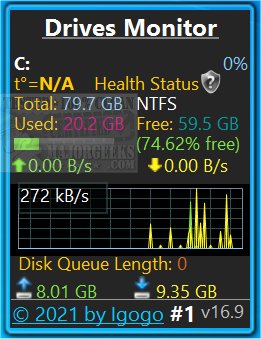
Drives Monitor 19.0 has been released, offering enhanced capabilities for visualizing both physical and logical disk activity by utilizing performance monitor data. This application is compatible with Windows 8.1 and 10, although users may need to install Desktop Gadgets Revived or similar software to successfully use it.
The application displays critical metrics for each disk, including the percentage of active time and the amount of data read and written per second. A real-time graph feature allows users to click on a specific drive letter, which opens a fly-out window with detailed information about the physical drive, such as model, capacity, type, number of partitions, cylinders, and sectors. Additionally, an Eject button is available for safely releasing USB devices.
Drives Monitor is capable of monitoring hidden and mounted drives. To help users manage disk space, the application features a disk space usage bar that turns red when free space is critically low and yellow when space is merely low. Users can configure the critical and warning thresholds in the settings. The settings also allow for the selection between physical and logical drives, exclusion of certain drives from monitoring, and customization of displayed information.
In addition to the features highlighted, Drives Monitor 19.0 may also benefit from improved user interface elements, enhanced performance metrics, and notifications for proactive disk management. Users are encouraged to explore the various settings to tailor the application to their specific monitoring needs.
For further assistance, users can refer to related resources, including guides on checking hard disk health, managing the SysMain service, addressing bad sectors, and optimizing SSD performance through secure erasing
The application displays critical metrics for each disk, including the percentage of active time and the amount of data read and written per second. A real-time graph feature allows users to click on a specific drive letter, which opens a fly-out window with detailed information about the physical drive, such as model, capacity, type, number of partitions, cylinders, and sectors. Additionally, an Eject button is available for safely releasing USB devices.
Drives Monitor is capable of monitoring hidden and mounted drives. To help users manage disk space, the application features a disk space usage bar that turns red when free space is critically low and yellow when space is merely low. Users can configure the critical and warning thresholds in the settings. The settings also allow for the selection between physical and logical drives, exclusion of certain drives from monitoring, and customization of displayed information.
In addition to the features highlighted, Drives Monitor 19.0 may also benefit from improved user interface elements, enhanced performance metrics, and notifications for proactive disk management. Users are encouraged to explore the various settings to tailor the application to their specific monitoring needs.
For further assistance, users can refer to related resources, including guides on checking hard disk health, managing the SysMain service, addressing bad sectors, and optimizing SSD performance through secure erasing
Drives Monitor 19.0 released
Drives Monitor utilizes performance monitor data to visualize physical or logical disk activity.