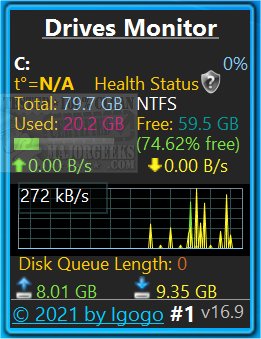
Drives Monitor 18.9 has been released, offering a comprehensive tool for visualizing both physical and logical disk activity through performance monitor data. This application is compatible with Windows 8.1 and 10, but users may need to install Desktop Gadgets Revived or a similar utility to ensure successful operation.
The software provides real-time analytics for each disk, displaying key metrics such as percentage of active time and the rate of bytes read and written per second. Users can interact with a real-time graph, clicking on a specific drive letter to access a fly-out window containing detailed information about the drive, including its model, capacity, type, number of partitions, cylinders, sectors, and more. Additionally, Drives Monitor features an Eject button for the safe removal of USB devices.
Notably, the application supports hidden and mounted drives, and it includes a visual alert system for disk space usage. If a drive is critically low on free space, the usage bar turns red, while a yellow bar indicates low disk space. Users can configure threshold percentages for critical and warning disk usage in the settings. Other customizable options include toggling between physical and logical drive monitoring, excluding specific drive letters or disk numbers from monitoring, and selecting the displayed information.
Extending the functionality, Drives Monitor could benefit from advanced predictive analytics to anticipate disk failures based on usage patterns and health metrics. Integration with cloud storage services for backup notifications and additional alert settings for unusual activity could further enhance user experience and data security. Moreover, a mobile companion app could allow users to monitor their drives remotely, providing peace of mind and immediate awareness of potential issues
The software provides real-time analytics for each disk, displaying key metrics such as percentage of active time and the rate of bytes read and written per second. Users can interact with a real-time graph, clicking on a specific drive letter to access a fly-out window containing detailed information about the drive, including its model, capacity, type, number of partitions, cylinders, sectors, and more. Additionally, Drives Monitor features an Eject button for the safe removal of USB devices.
Notably, the application supports hidden and mounted drives, and it includes a visual alert system for disk space usage. If a drive is critically low on free space, the usage bar turns red, while a yellow bar indicates low disk space. Users can configure threshold percentages for critical and warning disk usage in the settings. Other customizable options include toggling between physical and logical drive monitoring, excluding specific drive letters or disk numbers from monitoring, and selecting the displayed information.
Extending the functionality, Drives Monitor could benefit from advanced predictive analytics to anticipate disk failures based on usage patterns and health metrics. Integration with cloud storage services for backup notifications and additional alert settings for unusual activity could further enhance user experience and data security. Moreover, a mobile companion app could allow users to monitor their drives remotely, providing peace of mind and immediate awareness of potential issues
Drives Monitor 18.9 released
Drives Monitor utilizes performance monitor data to visualize physical or logical disk activity.