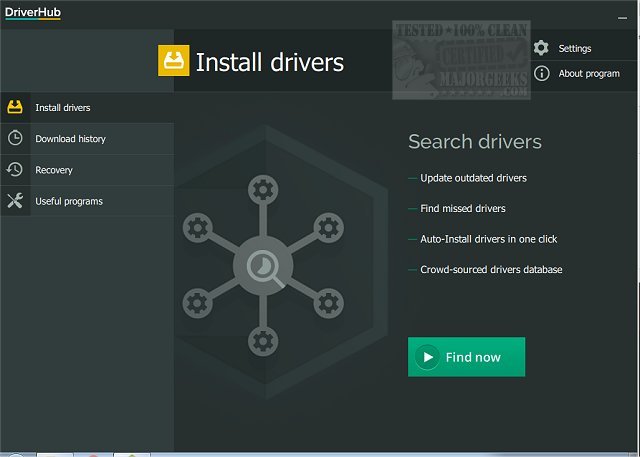
DriverHub has released version 1.5.2, a software tool designed to streamline the process of identifying and updating outdated drivers on your computer. The application performs a swift scan of your system to detect any drivers that are not up-to-date, subsequently presenting you with the latest versions available for installation. Keeping your drivers current is essential for maintaining optimal performance and security on your machine, as outdated drivers can lead to various issues that may significantly affect functionality.
The user-friendly interface of DriverHub simplifies the process of managing drivers by allowing users to easily select or deselect drivers from the list generated after the scan. Moreover, the program offers a feature to create a restore point prior to installation, which is advisable to safeguard against potential problems arising from new driver updates.
In addition to driver management, DriverHub includes a suite of useful system tools that provide quick access to features like display settings, PC management, control panel, and command prompt, among others. Users can also track their downloaded driver history, giving them insight into what has been installed previously.
With its visually appealing and well-organized layout, DriverHub empowers users to confidently update their drivers without the usual complexities associated with driver management.
Extension:
The release of DriverHub 1.5.2 reflects a growing need for users to maintain their systems efficiently, especially in an age where software and hardware updates are frequent. As technology evolves, the importance of reliable driver updates cannot be overstated; they play a critical role in ensuring compatibility with new software and enhancing system stability.
With the rise of remote work and online activities, users may encounter more diverse hardware configurations, increasing the chances of driver-related issues. Therefore, tools like DriverHub not only provide convenience but also contribute to a smoother digital experience by minimizing downtime caused by driver problems.
Looking ahead, it would be beneficial for DriverHub to consider incorporating additional features such as automatic scheduling for regular scans and updates, compatibility checks for upcoming operating system versions, and improved user support channels. This could further enhance the user experience, making driver management an even more seamless task for individuals and businesses alike
The user-friendly interface of DriverHub simplifies the process of managing drivers by allowing users to easily select or deselect drivers from the list generated after the scan. Moreover, the program offers a feature to create a restore point prior to installation, which is advisable to safeguard against potential problems arising from new driver updates.
In addition to driver management, DriverHub includes a suite of useful system tools that provide quick access to features like display settings, PC management, control panel, and command prompt, among others. Users can also track their downloaded driver history, giving them insight into what has been installed previously.
With its visually appealing and well-organized layout, DriverHub empowers users to confidently update their drivers without the usual complexities associated with driver management.
Extension:
The release of DriverHub 1.5.2 reflects a growing need for users to maintain their systems efficiently, especially in an age where software and hardware updates are frequent. As technology evolves, the importance of reliable driver updates cannot be overstated; they play a critical role in ensuring compatibility with new software and enhancing system stability.
With the rise of remote work and online activities, users may encounter more diverse hardware configurations, increasing the chances of driver-related issues. Therefore, tools like DriverHub not only provide convenience but also contribute to a smoother digital experience by minimizing downtime caused by driver problems.
Looking ahead, it would be beneficial for DriverHub to consider incorporating additional features such as automatic scheduling for regular scans and updates, compatibility checks for upcoming operating system versions, and improved user support channels. This could further enhance the user experience, making driver management an even more seamless task for individuals and businesses alike
DriverHub 1.5.2 released
DriverHub quickly scans your machine for any outdated drivers and then finds and displays the most current drivers available for installation.