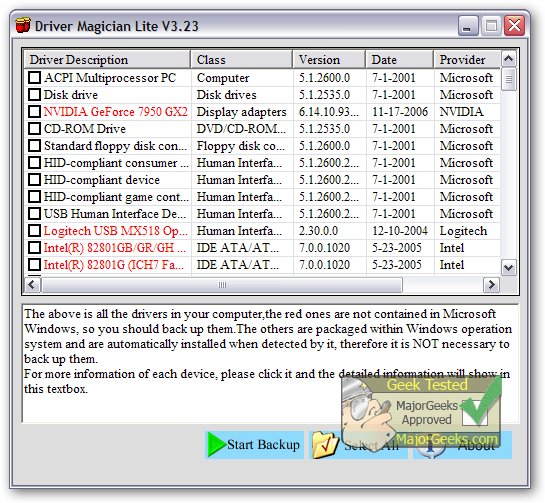
Driver Magician Lite 5.75 has been released, providing a comprehensive solution for managing device drivers. This software allows users to back up, restore, update, and uninstall drivers with ease. It scans the system to identify all hardware components and extracts their corresponding drivers for backup at a user-selected location. This feature proves invaluable when reinstalling or upgrading an operating system, as it allows users to quickly restore drivers, simulating the convenience of having original driver diskettes. After rebooting the system, the necessary hardware drivers are installed, ensuring the PC runs smoothly.
Additionally, Driver Magician Lite includes a built-in database that connects to the internet for hassle-free driver updates, saving users time in locating the correct drivers and enhancing the performance of their hardware. The software also offers functionality to detect unknown devices using its hardware identifier database, making it easier to manage all hardware components.
Key features of Driver Magician Lite include:
- Four backup modes for device drivers.
- One-click restoration of backed-up drivers.
- Driver updates to enhance system performance and stability.
- Uninstallation of outdated or unnecessary drivers.
- Live updates for both the device identifier database and driver updates.
- Detection of unknown devices.
- Backup options for additional items such as My Documents and Registry settings.
- Detailed hardware driver information.
- Creation of an auto-setup package (.EXE) for restoring drivers without needing to reinstall the software.
In addition to these features, users can refer to guides on downloading the latest drivers for Windows, backing up and restoring drivers, and managing Windows updates to prevent automatic driver downloads in Windows 10 and 11.
Overall, Driver Magician Lite 5.75 streamlines the process of driver management, making it an essential tool for both casual and advanced users looking to maintain their PC's hardware efficiently
Additionally, Driver Magician Lite includes a built-in database that connects to the internet for hassle-free driver updates, saving users time in locating the correct drivers and enhancing the performance of their hardware. The software also offers functionality to detect unknown devices using its hardware identifier database, making it easier to manage all hardware components.
Key features of Driver Magician Lite include:
- Four backup modes for device drivers.
- One-click restoration of backed-up drivers.
- Driver updates to enhance system performance and stability.
- Uninstallation of outdated or unnecessary drivers.
- Live updates for both the device identifier database and driver updates.
- Detection of unknown devices.
- Backup options for additional items such as My Documents and Registry settings.
- Detailed hardware driver information.
- Creation of an auto-setup package (.EXE) for restoring drivers without needing to reinstall the software.
In addition to these features, users can refer to guides on downloading the latest drivers for Windows, backing up and restoring drivers, and managing Windows updates to prevent automatic driver downloads in Windows 10 and 11.
Overall, Driver Magician Lite 5.75 streamlines the process of driver management, making it an essential tool for both casual and advanced users looking to maintain their PC's hardware efficiently
Driver Magician Lite 5.75 released
Driver Magician Lite offers a professional solution for device driver's backup, restoration, update, and removal.