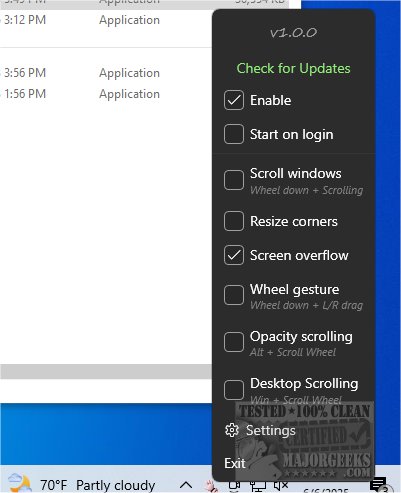
DragWin has officially launched version 1.1.6, a user-friendly application designed to enhance the multitasking experience by allowing users to move windows effortlessly with a simple right-click. This innovative tool eliminates the need for modifier keys, streamlining the way you interact with multiple applications on your screen.
Key Features and Benefits
DragWin excels in window management, enabling users to quickly move, resize, and snap application windows into place, thereby facilitating a more organized workspace. This is particularly advantageous for professionals and casual users alike who juggle numerous open applications simultaneously. For instance, if you're working with a web browser, a Word document, and a PDF viewer, DragWin simplifies the process of arranging these windows. By dragging them to the edges of your screen, the application automatically resizes and aligns them, allowing you to view all your content without clutter.
Enhanced Productivity
By utilizing DragWin, users can significantly reduce the time spent on manual window adjustments, allowing them to concentrate on their tasks more effectively. The application not only promotes a tidy workspace but also minimizes distractions, which is essential for maintaining focus in a busy digital environment.
Additional Features
- Right-Click Window Movement: Move windows effortlessly with a simple right-click.
- Resizing Options: Resize windows from the sides and corners as needed.
- Scrolling Functionality: Scroll through windows that may be hidden behind others using the middle-click scroll feature.
- Virtual Desktop Navigation: Easily scroll between virtual desktops from the top corners of the screen.
- FancyZones Integration: Option to auto-invoke FancyZones for advanced window arrangements.
- Multi-Display Support: Manage multiple monitors seamlessly, including scrolling between them with the middle mouse button.
- Opacity Control: Change a window's opacity while holding the Alt key for better visibility or focus.
- Fullscreen Compatibility: Ensures that fullscreen applications remain unaffected.
- Maintains Right-Click Functionality: Right-clicking remains unchanged, ensuring a seamless experience.
Conclusion
With its array of intuitive features, DragWin 1.1.6 is a revolutionary tool for anyone looking to optimize their screen layout and enhance productivity. By reducing window management frustrations, DragWin allows users to maintain focus on their tasks and improve their overall workflow.
Related Tools and Resources
For additional enhancements to your Windows experience, consider exploring tools like MajorGeeks Registry Tweaks, guides on adding color to the Start and Taskbar, and tutorials on changing text size for title bars in Windows 10 & 11
Key Features and Benefits
DragWin excels in window management, enabling users to quickly move, resize, and snap application windows into place, thereby facilitating a more organized workspace. This is particularly advantageous for professionals and casual users alike who juggle numerous open applications simultaneously. For instance, if you're working with a web browser, a Word document, and a PDF viewer, DragWin simplifies the process of arranging these windows. By dragging them to the edges of your screen, the application automatically resizes and aligns them, allowing you to view all your content without clutter.
Enhanced Productivity
By utilizing DragWin, users can significantly reduce the time spent on manual window adjustments, allowing them to concentrate on their tasks more effectively. The application not only promotes a tidy workspace but also minimizes distractions, which is essential for maintaining focus in a busy digital environment.
Additional Features
- Right-Click Window Movement: Move windows effortlessly with a simple right-click.
- Resizing Options: Resize windows from the sides and corners as needed.
- Scrolling Functionality: Scroll through windows that may be hidden behind others using the middle-click scroll feature.
- Virtual Desktop Navigation: Easily scroll between virtual desktops from the top corners of the screen.
- FancyZones Integration: Option to auto-invoke FancyZones for advanced window arrangements.
- Multi-Display Support: Manage multiple monitors seamlessly, including scrolling between them with the middle mouse button.
- Opacity Control: Change a window's opacity while holding the Alt key for better visibility or focus.
- Fullscreen Compatibility: Ensures that fullscreen applications remain unaffected.
- Maintains Right-Click Functionality: Right-clicking remains unchanged, ensuring a seamless experience.
Conclusion
With its array of intuitive features, DragWin 1.1.6 is a revolutionary tool for anyone looking to optimize their screen layout and enhance productivity. By reducing window management frustrations, DragWin allows users to maintain focus on their tasks and improve their overall workflow.
Related Tools and Resources
For additional enhancements to your Windows experience, consider exploring tools like MajorGeeks Registry Tweaks, guides on adding color to the Start and Taskbar, and tutorials on changing text size for title bars in Windows 10 & 11
DragWin 1.1.6 released
DragWin enables you to move windows by simply right-clicking on them, eliminating the need to use any modifier keys.