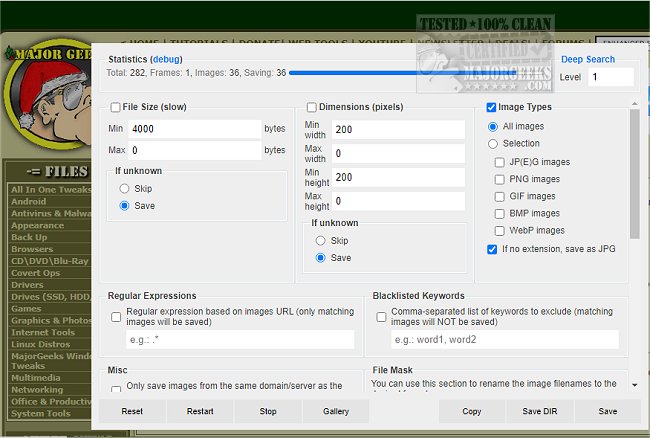
The Download All Images extension for Chrome, now at version 1.0.9, provides users with a powerful tool for saving multiple images from web pages. This extension allows for significant customization in the downloading process, enabling users to filter images by various criteria including file size, dimensions, and type (JPEG, PNG, BMP, or GIF).
One of the standout features of Download All Images is its ability to scan and identify images on a web page, even those embedded within iframes. Users can enhance their experience by applying filters to narrow down their selections based on specific characteristics. Additionally, the extension can determine the dimensions of images by analyzing only the header information, which optimizes the download process.
The extension also offers the capability to search for images in links, background scripts, and CSS files. Before downloading, users can preview their selected images in a gallery view, which temporarily displays all identified image files for easier selection. Users have control over the naming format of the saved images and can determine how the images will be organized within the resultant zip file.
Moreover, users can set up notifications for particular scenarios, such as when a webpage contains more than thirty images, ensuring they don't miss out on any content. Overall, Download All Images is a straightforward yet highly effective solution for anyone looking to efficiently download images from specific web pages.
As an extension of this summary, it would be beneficial for users to explore additional features that may come in future updates, such as enhanced sorting options, integration with cloud storage services for easy file management, or the ability to download images in bulk from multiple pages simultaneously. This could further streamline the process of collecting images for personal or professional use
One of the standout features of Download All Images is its ability to scan and identify images on a web page, even those embedded within iframes. Users can enhance their experience by applying filters to narrow down their selections based on specific characteristics. Additionally, the extension can determine the dimensions of images by analyzing only the header information, which optimizes the download process.
The extension also offers the capability to search for images in links, background scripts, and CSS files. Before downloading, users can preview their selected images in a gallery view, which temporarily displays all identified image files for easier selection. Users have control over the naming format of the saved images and can determine how the images will be organized within the resultant zip file.
Moreover, users can set up notifications for particular scenarios, such as when a webpage contains more than thirty images, ensuring they don't miss out on any content. Overall, Download All Images is a straightforward yet highly effective solution for anyone looking to efficiently download images from specific web pages.
As an extension of this summary, it would be beneficial for users to explore additional features that may come in future updates, such as enhanced sorting options, integration with cloud storage services for easy file management, or the ability to download images in bulk from multiple pages simultaneously. This could further streamline the process of collecting images for personal or professional use
Download All Images for Chrome 1.0.9 released
Download All Images for Chrome allows you to easily save images with a wide range of customization features, such as file size, dimensions, and image type.