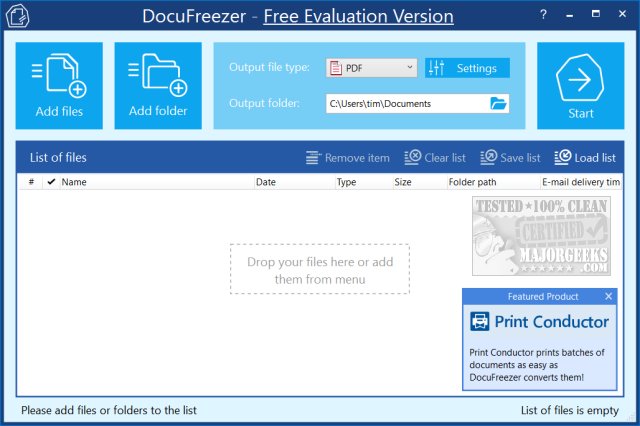
DocuFreezer 7.0 (Build 2026-03-02) has been released, offering users a free tool to convert documents and images into various formats such as PDF, TXT, JPG, TIFF, or PNG. This application "freezes" the appearance of the original documents, ensuring they remain unaltered regardless of the device used for viewing. Its user-friendly interface makes it simple to add files via click or drag-and-drop, select the desired output format, and specify the output folder. Although it includes a range of customizable settings, the default options suffice for most users. Once files are added, the conversion process is swift, and users can easily access their completed documents.
However, while DocuFreezer markets itself as a free application, it leaves a small watermark on converted files unless users opt for the paid professional version. Although the watermark is subtly placed and may go unnoticed by some, its presence may deter users seeking a completely free solution.
In addition to the standard features, users may appreciate the option to explore alternative tools and methods for document management, such as rotating images in Windows or restoring the classic Windows Photo Viewer.
To further enhance the experience, future updates could focus on improving the watermark policy, offering more customization options, and expanding output formats. Additionally, integrating collaboration features could allow users to share converted documents seamlessly, making DocuFreezer not just a conversion tool, but a comprehensive document management solution
However, while DocuFreezer markets itself as a free application, it leaves a small watermark on converted files unless users opt for the paid professional version. Although the watermark is subtly placed and may go unnoticed by some, its presence may deter users seeking a completely free solution.
In addition to the standard features, users may appreciate the option to explore alternative tools and methods for document management, such as rotating images in Windows or restoring the classic Windows Photo Viewer.
To further enhance the experience, future updates could focus on improving the watermark policy, offering more customization options, and expanding output formats. Additionally, integrating collaboration features could allow users to share converted documents seamlessly, making DocuFreezer not just a conversion tool, but a comprehensive document management solution
DocuFreezer 7.0 (Build 2026-03-02) released
DocuFreezer is a free application that converts your documents and images to PDF, TXT, JPG, TIFF, or PNG formats, "freezing" the look of the input documents and protecting them from any amendments.