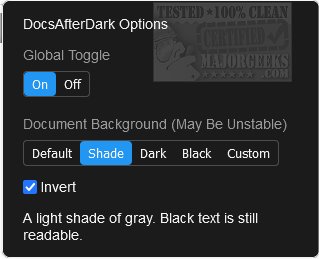
The latest release of DocsAfterDark, version 2.0.3, introduces an open-source extension/add-on that enables users to easily switch dark mode on and off for Google Docs. This tool enhances user experience by changing the document's background to darker shades through a simple selection process from various preset options. Users also have the flexibility to choose custom colors via a menu. Accessing the DocsAfterDark options is straightforward; just click on the icon located in the browser toolbar.
In addition to background color customization, the extension supports using any valid CSS value for backgrounds, including images and gradients, although this feature may not be fully stable on Chrome. The content of the document (excluding images) can be inverted to provide a darker background without altering the font color, catering to users who prefer maintaining text visibility against a dark backdrop. Users can quickly toggle dark mode on and off with a button located at the bottom left of the page, and a global toggle in the options menu allows for enabling or disabling the extension altogether.
DocsAfterDark is particularly beneficial for those looking to reduce eye strain during long periods of document editing or reading. The extension stands out as a modern enhancement for Google Docs, making it a valuable addition for users seeking a more comfortable working environment.
Furthermore, users interested in dark mode and visual customization may also find value in related guides for adjusting the appearance of Windows 10 and 11, including darkening the Start menu and taskbar, changing text size for title bars, and adding color to various UI elements. This reflects a growing trend towards user-centric design that prioritizes comfort and personalization in digital interfaces
In addition to background color customization, the extension supports using any valid CSS value for backgrounds, including images and gradients, although this feature may not be fully stable on Chrome. The content of the document (excluding images) can be inverted to provide a darker background without altering the font color, catering to users who prefer maintaining text visibility against a dark backdrop. Users can quickly toggle dark mode on and off with a button located at the bottom left of the page, and a global toggle in the options menu allows for enabling or disabling the extension altogether.
DocsAfterDark is particularly beneficial for those looking to reduce eye strain during long periods of document editing or reading. The extension stands out as a modern enhancement for Google Docs, making it a valuable addition for users seeking a more comfortable working environment.
Furthermore, users interested in dark mode and visual customization may also find value in related guides for adjusting the appearance of Windows 10 and 11, including darkening the Start menu and taskbar, changing text size for title bars, and adding color to various UI elements. This reflects a growing trend towards user-centric design that prioritizes comfort and personalization in digital interfaces
DocsAfterDark 2.0.3 released
DocsAfterDark is an Open Source extension/add-on that allows you to toggle dark mode on/off for Google Docs.