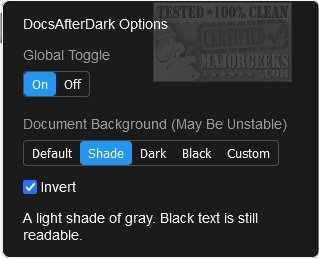
DocsAfterDark 2.0.1 has been released, enhancing the user experience for those who prefer a dark mode interface in Google Docs. This open-source extension allows users to easily switch between light and dark backgrounds with a simple selection process from preset options or by using custom colors. The extension can be accessed via an icon in the browser toolbar, providing a user-friendly way to modify document backgrounds.
One of the key features of DocsAfterDark is its ability to utilize various CSS values for backgrounds, including images and gradients, though users should be aware that this feature may be unstable on Chrome. The extension also includes an "invert" option, which inverts document content (excluding images) to maintain readability on darker backgrounds without altering font colors.
For convenience, users can temporarily toggle dark mode on and off by clicking a button located at the bottom left of the page. Additionally, there is a global toggle in the options menu that allows users to enable or disable the extension entirely. DocsAfterDark is particularly beneficial for those looking to reduce eye strain during extended periods of document editing.
In summary, DocsAfterDark 2.0.1 offers a modern solution for enhancing Google Docs with customizable dark mode features, making it a great tool for users seeking a more comfortable working environment. As the demand for user-friendly customization grows, further improvements and features may be expected in future updates, potentially including more color options and enhanced compatibility with various browsers
One of the key features of DocsAfterDark is its ability to utilize various CSS values for backgrounds, including images and gradients, though users should be aware that this feature may be unstable on Chrome. The extension also includes an "invert" option, which inverts document content (excluding images) to maintain readability on darker backgrounds without altering font colors.
For convenience, users can temporarily toggle dark mode on and off by clicking a button located at the bottom left of the page. Additionally, there is a global toggle in the options menu that allows users to enable or disable the extension entirely. DocsAfterDark is particularly beneficial for those looking to reduce eye strain during extended periods of document editing.
In summary, DocsAfterDark 2.0.1 offers a modern solution for enhancing Google Docs with customizable dark mode features, making it a great tool for users seeking a more comfortable working environment. As the demand for user-friendly customization grows, further improvements and features may be expected in future updates, potentially including more color options and enhanced compatibility with various browsers
DocsAfterDark 2.0.1 released
DocsAfterDark is an Open Source extension/add-on that allows you to toggle dark mode on/off for Google Docs.