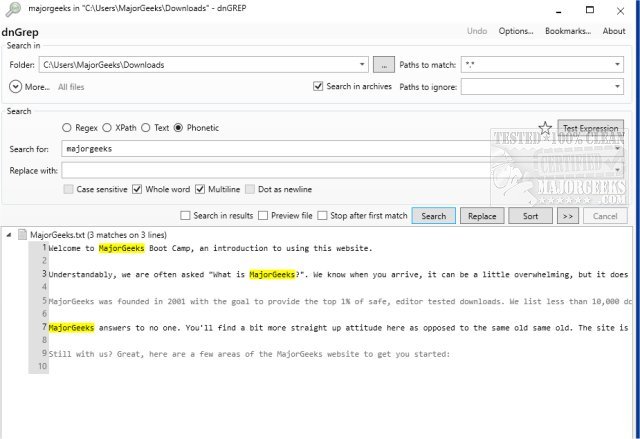
dnGrep has released version 4.6.63.0, enhancing its features as an open-source Windows tool designed for search and replace tasks. Acting as a graphical user interface (GUI) for GREP, dnGrep simplifies the process of searching through various file types, including text files, Word documents, PDFs, and archives. Users can employ text queries, regular expressions, XPath, and even phonetic searches for more efficient results.
The software offers a variety of functionalities, such as a search-and-replace option with an undo feature, a whole-file preview, and the ability to initiate searches directly from the right-click context menu in File Explorer. Additionally, dnGrep allows users to manage search results effectively by enabling file operations like moving, copying, or deleting, and it supports opening results in custom editors like Notepad++. Users can bookmark search patterns for easy access later and test complex queries in a dedicated Test window.
Despite having its last stable version released in 2015, dnGrep remains actively developed and updated. This continuous improvement ensures that users can benefit from the latest advancements in search technology.
In summary, dnGrep is a powerful tool that combines the robust capabilities of GREP with a user-friendly interface, making it an excellent option for anyone needing efficient file searching and manipulation on Windows. As it moves forward, users can expect further enhancements and features that will streamline their workflow even more.
Future updates could potentially include improved integration with cloud storage solutions, enhanced support for additional file formats, and more sophisticated search algorithms to cater to the evolving needs of users
The software offers a variety of functionalities, such as a search-and-replace option with an undo feature, a whole-file preview, and the ability to initiate searches directly from the right-click context menu in File Explorer. Additionally, dnGrep allows users to manage search results effectively by enabling file operations like moving, copying, or deleting, and it supports opening results in custom editors like Notepad++. Users can bookmark search patterns for easy access later and test complex queries in a dedicated Test window.
Despite having its last stable version released in 2015, dnGrep remains actively developed and updated. This continuous improvement ensures that users can benefit from the latest advancements in search technology.
In summary, dnGrep is a powerful tool that combines the robust capabilities of GREP with a user-friendly interface, making it an excellent option for anyone needing efficient file searching and manipulation on Windows. As it moves forward, users can expect further enhancements and features that will streamline their workflow even more.
Future updates could potentially include improved integration with cloud storage solutions, enhanced support for additional file formats, and more sophisticated search algorithms to cater to the evolving needs of users
dnGrep 4.6.63.0 released
dnGrep is an Open Source Windows search and replace tool capable of being used as a GUI for GREP.