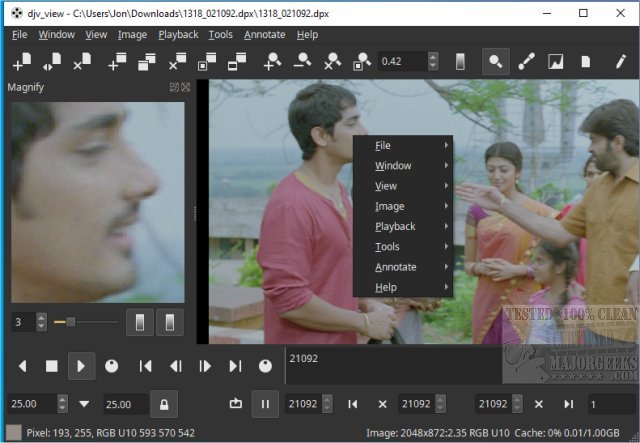
DJV 3.3.4 has been released, enhancing its reputation as a free and robust tool for managing image sequences. This software is particularly favored by filmmakers, colorists, and video editors due to its stunning visuals, precise audio control, and the ability to seamlessly playback high-resolution images.
Upon launching DJV on Windows, users encounter a familiar interface reminiscent of both video editing suites and image viewers. The layout is designed to minimize overwhelm by separating different task areas. Key components of the DJV interface include:
- Menu Bar: Located at the top, it houses essential commands under categories like "File" and "Edit."
- Toolbars: Positioned below or alongside the menu bar, these provide quick access to transport controls and other functions.
- Tab Bar: Found in the top-left of the viewport, it allows users to switch between loaded image sequences without cluttering the screen.
- Viewport: This is the main area for displaying frames, prioritizing high-quality playback.
- Timeline: Located below the viewport, it visualizes the animation structure, showing frame timing and keyframes, particularly with USD projects. Integration with OpenTimelineIO allows for the loading of complex timelines from other software.
To enhance user experience, DJV provides options for interface customization. Users can declutter their workspace by hiding unnecessary toolbars, the tab bar, or the status bar through the Window menu. This functionality empowers users to create a focused environment suited to their specific tasks, optimizing their workflow.
In conclusion, DJV stands out as an excellent choice for anyone needing to manage image sequences, thanks to its comprehensive features, including A/B comparison tools and support for OpenTimelineIO and OpenColorIO. Whether you are a professional or a hobbyist, DJV offers the capabilities needed for effective image sequence management.
For those looking to further explore video editing, additional resources, such as tutorials on using the Microsoft Photo App for video editing, can also be beneficial. This ensures that users have a variety of tools at their disposal to enhance their creative projects
Upon launching DJV on Windows, users encounter a familiar interface reminiscent of both video editing suites and image viewers. The layout is designed to minimize overwhelm by separating different task areas. Key components of the DJV interface include:
- Menu Bar: Located at the top, it houses essential commands under categories like "File" and "Edit."
- Toolbars: Positioned below or alongside the menu bar, these provide quick access to transport controls and other functions.
- Tab Bar: Found in the top-left of the viewport, it allows users to switch between loaded image sequences without cluttering the screen.
- Viewport: This is the main area for displaying frames, prioritizing high-quality playback.
- Timeline: Located below the viewport, it visualizes the animation structure, showing frame timing and keyframes, particularly with USD projects. Integration with OpenTimelineIO allows for the loading of complex timelines from other software.
To enhance user experience, DJV provides options for interface customization. Users can declutter their workspace by hiding unnecessary toolbars, the tab bar, or the status bar through the Window menu. This functionality empowers users to create a focused environment suited to their specific tasks, optimizing their workflow.
In conclusion, DJV stands out as an excellent choice for anyone needing to manage image sequences, thanks to its comprehensive features, including A/B comparison tools and support for OpenTimelineIO and OpenColorIO. Whether you are a professional or a hobbyist, DJV offers the capabilities needed for effective image sequence management.
For those looking to further explore video editing, additional resources, such as tutorials on using the Microsoft Photo App for video editing, can also be beneficial. This ensures that users have a variety of tools at their disposal to enhance their creative projects
DJV 3.3.4 released
DJV is a free and powerful tool for managing image sequences that offers stunning visuals, precise audio control, and seamless playback of high-resolution images, making it an excellent choice for filmmakers, colorists, and video editors.