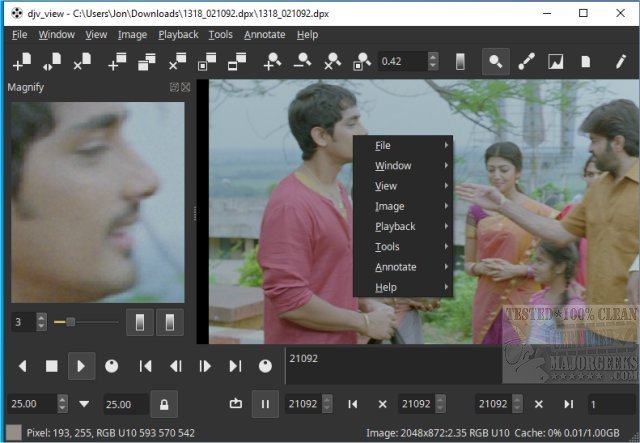
DJV 3.3.1 is a free and robust software designed for managing image sequences, catering particularly to filmmakers, colorists, and video editors. It offers high-quality visuals, precise audio controls, and smooth playback of high-resolution images. The user interface is organized into distinct sections, making it user-friendly and customizable to reduce clutter during workflow. Key components of the interface include a menu bar for essential commands, toolbars for quick access to functions, a tab bar for navigating multiple image sequences, a viewport for displaying frames, and a timeline for visualizing animation structure. Users can easily customize their workspace by hiding non-essential elements through the Window menu, allowing for a more focused and efficient editing experience. DJV also features A/B comparison tools, OpenTimelineIO integration, and OpenColorIO support, making it a valuable tool for both professionals and enthusiasts.
Extended Insights on DJV 3.3.1
The release of DJV 3.3.1 further solidifies its position as a premier choice for image sequence management. With the advancement of digital media production, the ability to streamline workflows has become essential. DJV’s customization features not only enhance the user experience but also cater to the specific needs of different users, from beginners to seasoned professionals.
Moreover, the integration with OpenTimelineIO and OpenColorIO signifies DJV’s commitment to staying updated with industry standards, enabling users to import and manage complex timelines and color information seamlessly. This makes DJV not just a playback tool but a comprehensive solution for managing the entire visual workflow.
As the film and video industry evolves, tools like DJV are crucial in facilitating collaboration among teams, as they allow for easy sharing of image sequences and timelines. This is particularly beneficial in environments where multiple stakeholders are involved in the editing process.
In conclusion, DJV 3.3.1 is not merely an image viewer; it is a powerful platform that combines functionality with flexibility, making it a go-to application for efficiently managing image sequences in various professional settings. Whether you are editing a film, conducting color grading, or simply reviewing sequences, DJV offers the tools necessary to achieve high-quality results with ease. As digital content continues to grow, tools like DJV will be indispensable in the creative process
Extended Insights on DJV 3.3.1
The release of DJV 3.3.1 further solidifies its position as a premier choice for image sequence management. With the advancement of digital media production, the ability to streamline workflows has become essential. DJV’s customization features not only enhance the user experience but also cater to the specific needs of different users, from beginners to seasoned professionals.
Moreover, the integration with OpenTimelineIO and OpenColorIO signifies DJV’s commitment to staying updated with industry standards, enabling users to import and manage complex timelines and color information seamlessly. This makes DJV not just a playback tool but a comprehensive solution for managing the entire visual workflow.
As the film and video industry evolves, tools like DJV are crucial in facilitating collaboration among teams, as they allow for easy sharing of image sequences and timelines. This is particularly beneficial in environments where multiple stakeholders are involved in the editing process.
In conclusion, DJV 3.3.1 is not merely an image viewer; it is a powerful platform that combines functionality with flexibility, making it a go-to application for efficiently managing image sequences in various professional settings. Whether you are editing a film, conducting color grading, or simply reviewing sequences, DJV offers the tools necessary to achieve high-quality results with ease. As digital content continues to grow, tools like DJV will be indispensable in the creative process
DJV 3.3.1 released
DJV is a free and powerful tool for managing image sequences that offers stunning visuals, precise audio control, and seamless playback of high-resolution images, making it an excellent choice for filmmakers, colorists, and video editors.