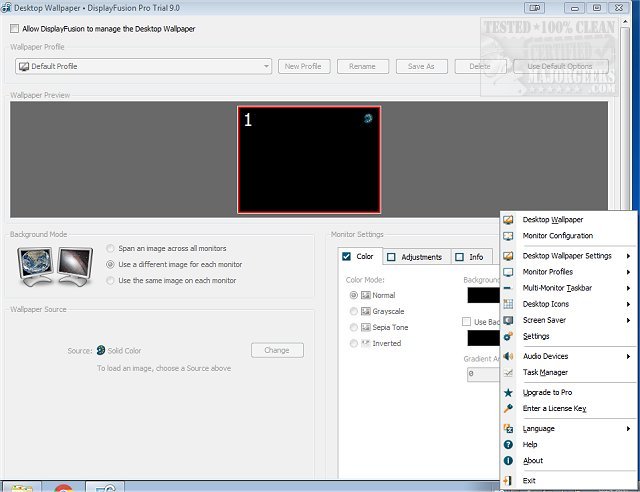
DisplayFusion has released version 12.0.2, a powerful software solution designed to enhance the management of multiple monitor setups. With features like multi-monitor taskbars and extensive customization options, DisplayFusion simplifies the complexities of working across multiple screens. As multi-monitor use becomes increasingly prevalent, DisplayFusion provides tools that streamline the organization of your workspace, allowing users to configure taskbars that can display all windows or just those on specific monitors.
Key features of DisplayFusion include the ability to set different wallpapers on each monitor, span images across multiple screens, and easily manage window placement through Smart Window Management. This latter feature allows for seamless movement of windows between monitors with simple gestures, enhancing multitasking efficiency.
DisplayFusion offers both free and Pro versions. The free version provides essential tools such as Multi-Monitor Taskbars and basic wallpaper customization, ideal for casual users. However, for those looking for advanced capabilities, DisplayFusion Pro includes a comprehensive suite of features—ranging from customizable hotkeys and macros to advanced monitor controls and task automation. Pro users can also utilize remote control through a mobile app, allowing for enhanced flexibility and control.
In summary, DisplayFusion is a standout tool that elevates the multi-monitor experience with its robust features and customization options. It empowers users to tailor their work environment to their specific needs, ultimately boosting productivity and efficiency.
Extending the discussion, as the demand for multi-monitor setups continues to rise in various fields such as gaming, graphic design, and remote work, tools like DisplayFusion become essential for optimizing workflows. The software’s intuitive interface and powerful features not only enhance user productivity but also improve overall satisfaction by allowing users to create a workspace that aligns with their personal workflow preferences. With ongoing updates and enhancements, DisplayFusion is well-positioned to remain a leading choice for users seeking to maximize their multi-monitor setups. Additionally, as technology evolves, we may expect further innovations in multi-monitor management software, possibly integrating AI-driven features to automate common tasks and improve user experience even more
Key features of DisplayFusion include the ability to set different wallpapers on each monitor, span images across multiple screens, and easily manage window placement through Smart Window Management. This latter feature allows for seamless movement of windows between monitors with simple gestures, enhancing multitasking efficiency.
DisplayFusion offers both free and Pro versions. The free version provides essential tools such as Multi-Monitor Taskbars and basic wallpaper customization, ideal for casual users. However, for those looking for advanced capabilities, DisplayFusion Pro includes a comprehensive suite of features—ranging from customizable hotkeys and macros to advanced monitor controls and task automation. Pro users can also utilize remote control through a mobile app, allowing for enhanced flexibility and control.
In summary, DisplayFusion is a standout tool that elevates the multi-monitor experience with its robust features and customization options. It empowers users to tailor their work environment to their specific needs, ultimately boosting productivity and efficiency.
Extending the discussion, as the demand for multi-monitor setups continues to rise in various fields such as gaming, graphic design, and remote work, tools like DisplayFusion become essential for optimizing workflows. The software’s intuitive interface and powerful features not only enhance user productivity but also improve overall satisfaction by allowing users to create a workspace that aligns with their personal workflow preferences. With ongoing updates and enhancements, DisplayFusion is well-positioned to remain a leading choice for users seeking to maximize their multi-monitor setups. Additionally, as technology evolves, we may expect further innovations in multi-monitor management software, possibly integrating AI-driven features to automate common tasks and improve user experience even more
DisplayFusion 12.0.2 released
DisplayFusion enables you to manage multiple monitors with powerful features, including multi-monitor taskbars and fully customizable functions.