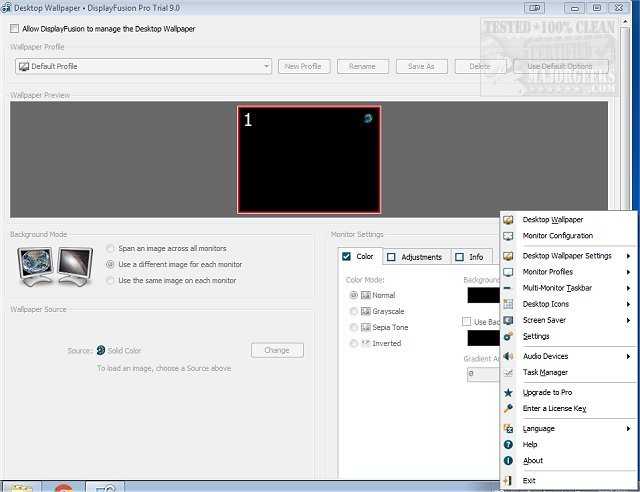
DisplayFusion is a powerful software tool designed to enhance the management of multiple monitor setups, which have become increasingly commonplace. The latest version, DisplayFusion 12.0, introduces a suite of features aimed at improving user efficiency and customization in multi-monitor environments.
Key Features and Benefits
DisplayFusion simplifies the handling of multiple displays by providing customizable taskbars for each screen, allowing users to either see all open windows or just those relevant to a specific monitor. Additional features include:
- Smart Window Management: Offers intuitive methods (like middle-clicking) for moving windows across screens seamlessly.
- Wallpaper Management: Users can apply different images or span a single image across multiple monitors with various sizing options, including gradients and solid colors.
- Customization: The software allows for extensive personalization, such as color adjustments and the ability to load images from local storage or online sources.
Free vs. Pro Versions
DisplayFusion offers a free version with essential features, including multi-monitor taskbars and basic wallpaper customization. However, users can access all Pro features for a 30-day free trial. After this period, the software reverts to the free tier. The Pro version includes advanced functionalities such as:
- Custom macros and hotkeys
- Fine-tuning monitor settings (resolution, refresh rates)
- Multi-monitor screen savers and enhanced wallpaper management
- Remote control capabilities via a mobile app
These advanced features cater to users with complex setups or those who desire extensive customization.
Conclusion and Verdict
DisplayFusion stands out as a premier tool for managing multiple monitors, offering a rich set of features that significantly enhance productivity and user experience. Its flexibility and customization options make it suitable for both casual users and power users alike, empowering them to tailor their multi-monitor setup to their specific needs. Embracing DisplayFusion can lead to a more organized, efficient workspace, making it a valuable addition for anyone working with multiple displays.
Further Exploration
For those looking to maximize their multi-monitor experience, DisplayFusion also offers guides on managing monitors effectively, adjusting DPI scaling levels in Windows, and accessing windows that may be off-screen, enhancing the overall usability of multiple display configurations
Key Features and Benefits
DisplayFusion simplifies the handling of multiple displays by providing customizable taskbars for each screen, allowing users to either see all open windows or just those relevant to a specific monitor. Additional features include:
- Smart Window Management: Offers intuitive methods (like middle-clicking) for moving windows across screens seamlessly.
- Wallpaper Management: Users can apply different images or span a single image across multiple monitors with various sizing options, including gradients and solid colors.
- Customization: The software allows for extensive personalization, such as color adjustments and the ability to load images from local storage or online sources.
Free vs. Pro Versions
DisplayFusion offers a free version with essential features, including multi-monitor taskbars and basic wallpaper customization. However, users can access all Pro features for a 30-day free trial. After this period, the software reverts to the free tier. The Pro version includes advanced functionalities such as:
- Custom macros and hotkeys
- Fine-tuning monitor settings (resolution, refresh rates)
- Multi-monitor screen savers and enhanced wallpaper management
- Remote control capabilities via a mobile app
These advanced features cater to users with complex setups or those who desire extensive customization.
Conclusion and Verdict
DisplayFusion stands out as a premier tool for managing multiple monitors, offering a rich set of features that significantly enhance productivity and user experience. Its flexibility and customization options make it suitable for both casual users and power users alike, empowering them to tailor their multi-monitor setup to their specific needs. Embracing DisplayFusion can lead to a more organized, efficient workspace, making it a valuable addition for anyone working with multiple displays.
Further Exploration
For those looking to maximize their multi-monitor experience, DisplayFusion also offers guides on managing monitors effectively, adjusting DPI scaling levels in Windows, and accessing windows that may be off-screen, enhancing the overall usability of multiple display configurations
DisplayFusion 12.0 released
DisplayFusion enables you to manage multiple monitors with powerful features, including multi-monitor taskbars and fully customizable functions.