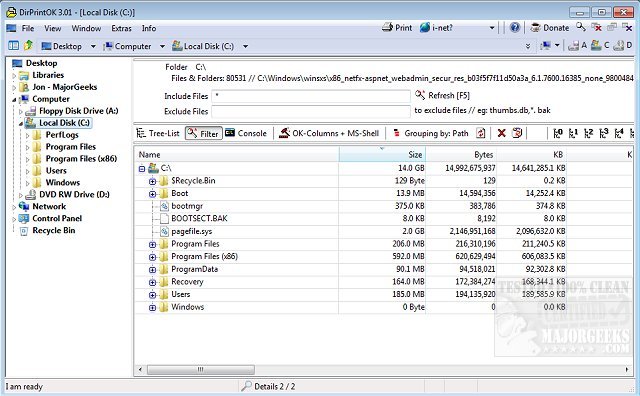
DirPrintOK version 7.53 has been released, providing users with a quick and efficient freeware tool for printing the contents of specific directories. This portable application simplifies the process of printing directory contents by allowing users to select a target directory and filter file details, such as including or excluding MP3 ID3 tags, before hitting the print button.
The software features a print preview function with a variable aspect ratio, enabling users to visualize the output before printing. Additionally, it offers export options to various formats including XLS, HTML, CSV, and TXT. Users can choose from several viewing modes, including tree-list, tree-list-plus, filters, and console views.
Key features of DirPrintOK include:
- Grouping of files by extension, modification time, size, or folder.
- Multi-tab functionality that allows users to open a second folder in a new tab.
- Capability to print directory lists using cmd.exe.
For users looking for similar resources, helpful guides are available on managing installed printers in Windows, adding or removing 'Devices and Printers' in Windows 10 and 11, and troubleshooting printer issues on these operating systems.
To extend the information, DirPrintOK can be particularly beneficial for professionals who often need to document file structures or share directory contents with colleagues. Its versatility with different file formats makes it suitable for various tasks, such as archiving, reporting, or even inventory management. The software could also be enhanced in future updates with additional features such as cloud integration or advanced filtering options to cater to diverse user needs
The software features a print preview function with a variable aspect ratio, enabling users to visualize the output before printing. Additionally, it offers export options to various formats including XLS, HTML, CSV, and TXT. Users can choose from several viewing modes, including tree-list, tree-list-plus, filters, and console views.
Key features of DirPrintOK include:
- Grouping of files by extension, modification time, size, or folder.
- Multi-tab functionality that allows users to open a second folder in a new tab.
- Capability to print directory lists using cmd.exe.
For users looking for similar resources, helpful guides are available on managing installed printers in Windows, adding or removing 'Devices and Printers' in Windows 10 and 11, and troubleshooting printer issues on these operating systems.
To extend the information, DirPrintOK can be particularly beneficial for professionals who often need to document file structures or share directory contents with colleagues. Its versatility with different file formats makes it suitable for various tasks, such as archiving, reporting, or even inventory management. The software could also be enhanced in future updates with additional features such as cloud integration or advanced filtering options to cater to diverse user needs
DirPrintOK 7.53 released
DirPrintOK is a fast, freeware, portable option for printing the content of a specific directory.