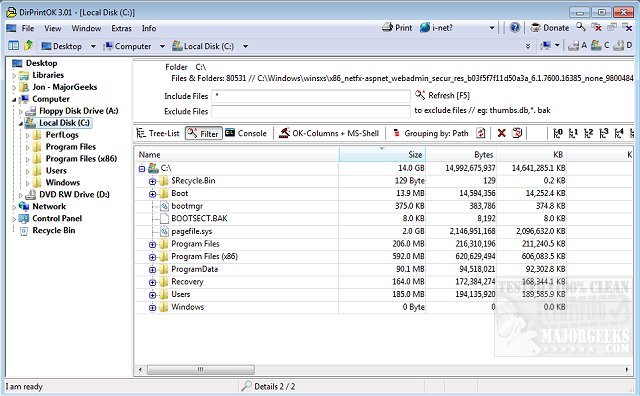
DirPrintOK version 7.52 has been released, offering users a fast, free, and portable solution for printing the contents of specific directories. This software simplifies the printing process by allowing users to select their target directory and apply filters to include or exclude specific file details, such as MP3 ID3 tags, before initiating the print command.
Key features of DirPrintOK include:
- Print Preview: Users can view the print layout with a variable aspect ratio before finalizing their print job.
- Export Options: The software supports exporting directory content to various formats including XLS, HTML, CSV, and TXT.
- Flexible Viewing Options: Users can choose from multiple viewing styles such as tree-list, tree-list-plus, filters, and console.
- Grouping Capabilities: Files can be grouped by attributes like file extension, modification time, size, or folders.
- Multi-Tab Functionality: Users can open a second directory in a new tab for easier management.
- Command Line Integration: It allows printing directory listings directly from the command prompt (cmd.exe).
In addition to its core functionalities, DirPrintOK is complemented by a set of related guides on managing printers in Windows, including how to show all installed printers, add or remove 'Devices and Printers' from the PC, and troubleshoot common printer issues on Windows 10 and 11.
As digital file management continues to evolve, tools like DirPrintOK remain essential for users needing efficient and straightforward ways to document and manage their files. Future iterations could further enhance user experience by incorporating cloud integration for remote printing or additional customization features for print layouts
Key features of DirPrintOK include:
- Print Preview: Users can view the print layout with a variable aspect ratio before finalizing their print job.
- Export Options: The software supports exporting directory content to various formats including XLS, HTML, CSV, and TXT.
- Flexible Viewing Options: Users can choose from multiple viewing styles such as tree-list, tree-list-plus, filters, and console.
- Grouping Capabilities: Files can be grouped by attributes like file extension, modification time, size, or folders.
- Multi-Tab Functionality: Users can open a second directory in a new tab for easier management.
- Command Line Integration: It allows printing directory listings directly from the command prompt (cmd.exe).
In addition to its core functionalities, DirPrintOK is complemented by a set of related guides on managing printers in Windows, including how to show all installed printers, add or remove 'Devices and Printers' from the PC, and troubleshoot common printer issues on Windows 10 and 11.
As digital file management continues to evolve, tools like DirPrintOK remain essential for users needing efficient and straightforward ways to document and manage their files. Future iterations could further enhance user experience by incorporating cloud integration for remote printing or additional customization features for print layouts
DirPrintOK 7.52 released
DirPrintOK is a fast, freeware, portable option for printing the content of a specific directory.