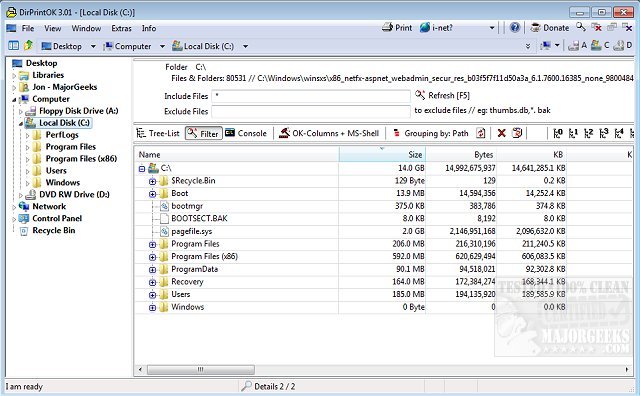
DirPrintOK 7.49 has been released as a free, portable software solution designed for efficiently printing the contents of a specific directory. This user-friendly tool simplifies the process of printing directory contents by allowing users to select their desired folder and customize file details, such as including or excluding MP3 ID3 tags, before hitting the print button.
The software also features a print preview option with a variable aspect ratio, and users can export their directory listings to various formats, including XLS, HTML, CSV, and TXT. To enhance usability, DirPrintOK offers multiple viewing options, including tree-list, tree-list-plus, filters, and console views. Key features of DirPrintOK include:
- Grouping capabilities based on file extension, modification time, size, or folders.
- A multi-tab function that allows users to open a second folder in a new tab.
- The ability to print directory lists from the command prompt (cmd.exe).
In addition to its main functionalities, DirPrintOK is accompanied by helpful resources on managing printers in Windows, such as how to view and manage installed printers, add or remove devices from "This PC," and troubleshoot common printer issues in Windows 10 and 11.
Overall, DirPrintOK 7.49 presents an efficient and versatile solution for users needing to print directory contents, making it a valuable tool for both casual users and professionals. With its ongoing development and feature enhancements, it continues to meet the evolving needs of its user base
The software also features a print preview option with a variable aspect ratio, and users can export their directory listings to various formats, including XLS, HTML, CSV, and TXT. To enhance usability, DirPrintOK offers multiple viewing options, including tree-list, tree-list-plus, filters, and console views. Key features of DirPrintOK include:
- Grouping capabilities based on file extension, modification time, size, or folders.
- A multi-tab function that allows users to open a second folder in a new tab.
- The ability to print directory lists from the command prompt (cmd.exe).
In addition to its main functionalities, DirPrintOK is accompanied by helpful resources on managing printers in Windows, such as how to view and manage installed printers, add or remove devices from "This PC," and troubleshoot common printer issues in Windows 10 and 11.
Overall, DirPrintOK 7.49 presents an efficient and versatile solution for users needing to print directory contents, making it a valuable tool for both casual users and professionals. With its ongoing development and feature enhancements, it continues to meet the evolving needs of its user base
DirPrintOK 7.49 released
DirPrintOK is a fast, freeware, portable option for printing the content of a specific directory.