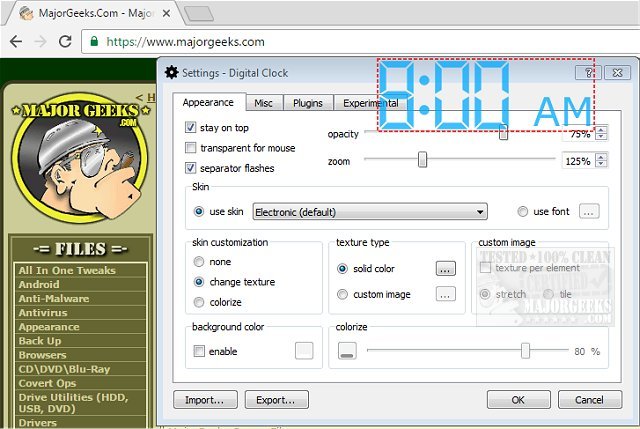
Digital Clock version 5.1.9 has been released, offering users a versatile and portable timepiece for their desktop. This application aims to provide a user-friendly experience with easy configuration options and a variety of settings that allow for personalization. Users can choose from multiple display types and create custom skins using a straightforward help guide, if needed. The software includes several pre-designed themes such as Vintage Digits, Binary Clock, Origami Style, Floral Digits, and seasonal themes like Christmas.
The Digital Clock is designed to be movable across the desktop and can be set to remain in view on top of other windows. Users have the flexibility to adjust various visual elements including opacity, size, background color, and fonts to suit their preferences.
Key features of Digital Clock include:
- Customizable skins
- Zoom functionality
- Alarm settings and hourly signals
- Color options for the clock display
- Texture options instead of plain colors
- Plugin support
- Multilingual capabilities
- Retina (HiDPI) display compatibility
- Support for multiple monitors
- Option to autostart with the system boot
In addition, the software is cross-platform, making it accessible to a wider range of users.
For those interested in enhancing their time management experience, there are also related guides available, such as how to display multiple clocks on Windows, how to fix incorrect date or time settings, how to show only the time on the Windows 10 taskbar, and how to remove the clock from the taskbar entirely.
Overall, Digital Clock 5.1.9 provides a fun and functional way to keep track of time on your desktop with ample customization options to keep it visually appealing and aligned with personal tastes
The Digital Clock is designed to be movable across the desktop and can be set to remain in view on top of other windows. Users have the flexibility to adjust various visual elements including opacity, size, background color, and fonts to suit their preferences.
Key features of Digital Clock include:
- Customizable skins
- Zoom functionality
- Alarm settings and hourly signals
- Color options for the clock display
- Texture options instead of plain colors
- Plugin support
- Multilingual capabilities
- Retina (HiDPI) display compatibility
- Support for multiple monitors
- Option to autostart with the system boot
In addition, the software is cross-platform, making it accessible to a wider range of users.
For those interested in enhancing their time management experience, there are also related guides available, such as how to display multiple clocks on Windows, how to fix incorrect date or time settings, how to show only the time on the Windows 10 taskbar, and how to remove the clock from the taskbar entirely.
Overall, Digital Clock 5.1.9 provides a fun and functional way to keep track of time on your desktop with ample customization options to keep it visually appealing and aligned with personal tastes
Digital Clock 5.1.9 released
Digital Clock gives you a straightforward portable timepiece for display on your desktop.