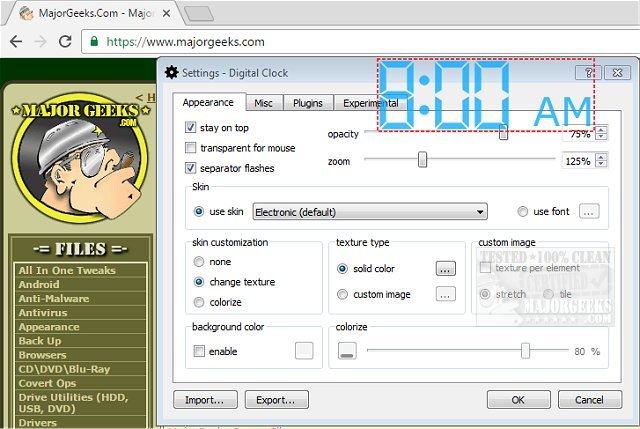
Digital Clock version 5.1.8 has been released, providing users with a simple and portable timepiece for their desktop. This application allows for easy configuration and offers various fun settings to customize the clock to individual preferences. Users can choose from multiple display types and even create personalized skins, aided by a straightforward help file. The software comes pre-loaded with several ready-to-use designs, including Vintage Digits, Binary Clock, Origami Style, Floral Digits, and various Christmas themes.
Additionally, users can position the clock anywhere on their desktop and set it to always stay on top of other windows. The application includes adjustable settings for opacity, size, background color, and font styles, ensuring a unique and enjoyable experience.
Key features of Digital Clock include:
- Customizable skins
- Zoom functionality
- Alarm signals and hourly notifications
- Customizable clock colors and textures
- Plugin support
- Multilanguage availability
- Retina (HiDPI) display compatibility
- Support for multiple monitors
- Cross-platform functionality
- Autostart option with system boot
This versatile desktop clock offers a fun and engaging way to keep track of time while providing enough customization options to maintain a fresh look.
In addition to the Digital Clock features, users may also find it helpful to explore related topics such as displaying multiple clocks on Windows, fixing incorrect date or time settings in the Windows Clock, showing only the time on the Windows 10 taskbar, or removing the clock from the Windows 10 taskbar. As technology continues to evolve, having tools like Digital Clock can enhance productivity and personalize the user experience on desktop environments
Additionally, users can position the clock anywhere on their desktop and set it to always stay on top of other windows. The application includes adjustable settings for opacity, size, background color, and font styles, ensuring a unique and enjoyable experience.
Key features of Digital Clock include:
- Customizable skins
- Zoom functionality
- Alarm signals and hourly notifications
- Customizable clock colors and textures
- Plugin support
- Multilanguage availability
- Retina (HiDPI) display compatibility
- Support for multiple monitors
- Cross-platform functionality
- Autostart option with system boot
This versatile desktop clock offers a fun and engaging way to keep track of time while providing enough customization options to maintain a fresh look.
In addition to the Digital Clock features, users may also find it helpful to explore related topics such as displaying multiple clocks on Windows, fixing incorrect date or time settings in the Windows Clock, showing only the time on the Windows 10 taskbar, or removing the clock from the Windows 10 taskbar. As technology continues to evolve, having tools like Digital Clock can enhance productivity and personalize the user experience on desktop environments
Digital Clock 5.1.8 released
Digital Clock gives you a straightforward portable timepiece for display on your desktop.