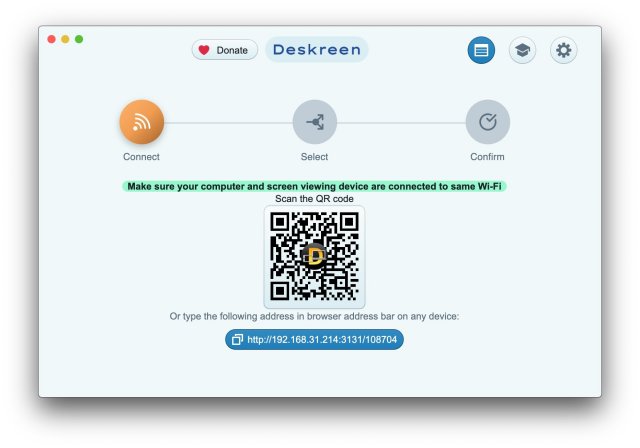
Deskreen 3.2.12 has been released, enhancing its capabilities as a versatile desktop application that transforms any device with a web browser into a secondary screen for your computer, utilizing a Wi-Fi connection. This flexibility makes it an ideal tool for various scenarios, including presentations, collaborative work, and video conferencing.
What is Deskreen?
Deskreen allows users to mirror their entire computer display onto any connected device's screen, which is particularly useful for presentations and sharing content. Additionally, it offers the ability to limit sharing to a specific application window, thus minimizing distractions while presenting targeted information.
Virtual Display Adapter and Flip Screen Mode
Utilizing a Virtual Display Adapter, Deskreen provides a true extended desktop experience. Even without this feature, users can activate Flip Screen Mode to mirror their screen on any device, a function that serves as a teleprompter for video bloggers who need to maintain eye contact during live streams or video calls.
Offline Functionality
One of Deskreen’s distinguishing features is its ability to operate without internet connectivity, relying solely on a local Wi-Fi network. This functionality has proven beneficial for users who require offline setups, such as in remote locations or during events where internet access is limited.
Quality Management and Multi-Device Connectivity
Deskreen allows users to adjust video quality during screen sharing, with support for automatic quality adjustments to ensure smooth performance. Additionally, it supports multiple device connections simultaneously, making it suitable for larger presentations or collaborative projects.
Key Features of Deskreen:
- Second Screen: Utilize any web-enabled device as an additional screen for your computer.
- Screen Sharing: Share your entire screen or limit to a specific application view.
- Teleprompter Mode: Ideal for video bloggers needing a teleprompter effect during recordings or live sessions.
- Wi-Fi Compatibility: Connect without the need for cables, enhancing mobility.
- Multiple Connections: Support for connecting numerous devices at once for broader accessibility.
Conclusion
Deskreen stands out as an essential tool for anyone seeking flexibility and control in their digital experience. Its ability to function offline, alongside its diverse features, makes it a valuable asset for both professional and personal use. As the digital landscape continues to evolve, Deskreen meets the demands of modern users, providing innovative solutions for a range of applications from engaging presentations to seamless virtual collaborations.
Future Prospects
Looking ahead, Deskreen could explore integration with more platforms and devices, enhance user interface design for even easier navigation, and expand its features to include advanced collaborative tools. There is also potential for incorporating user feedback to further tailor the application to meet diverse user needs, ensuring that it remains at the forefront of digital presentation and screen-sharing solutions
What is Deskreen?
Deskreen allows users to mirror their entire computer display onto any connected device's screen, which is particularly useful for presentations and sharing content. Additionally, it offers the ability to limit sharing to a specific application window, thus minimizing distractions while presenting targeted information.
Virtual Display Adapter and Flip Screen Mode
Utilizing a Virtual Display Adapter, Deskreen provides a true extended desktop experience. Even without this feature, users can activate Flip Screen Mode to mirror their screen on any device, a function that serves as a teleprompter for video bloggers who need to maintain eye contact during live streams or video calls.
Offline Functionality
One of Deskreen’s distinguishing features is its ability to operate without internet connectivity, relying solely on a local Wi-Fi network. This functionality has proven beneficial for users who require offline setups, such as in remote locations or during events where internet access is limited.
Quality Management and Multi-Device Connectivity
Deskreen allows users to adjust video quality during screen sharing, with support for automatic quality adjustments to ensure smooth performance. Additionally, it supports multiple device connections simultaneously, making it suitable for larger presentations or collaborative projects.
Key Features of Deskreen:
- Second Screen: Utilize any web-enabled device as an additional screen for your computer.
- Screen Sharing: Share your entire screen or limit to a specific application view.
- Teleprompter Mode: Ideal for video bloggers needing a teleprompter effect during recordings or live sessions.
- Wi-Fi Compatibility: Connect without the need for cables, enhancing mobility.
- Multiple Connections: Support for connecting numerous devices at once for broader accessibility.
Conclusion
Deskreen stands out as an essential tool for anyone seeking flexibility and control in their digital experience. Its ability to function offline, alongside its diverse features, makes it a valuable asset for both professional and personal use. As the digital landscape continues to evolve, Deskreen meets the demands of modern users, providing innovative solutions for a range of applications from engaging presentations to seamless virtual collaborations.
Future Prospects
Looking ahead, Deskreen could explore integration with more platforms and devices, enhance user interface design for even easier navigation, and expand its features to include advanced collaborative tools. There is also potential for incorporating user feedback to further tailor the application to meet diverse user needs, ensuring that it remains at the forefront of digital presentation and screen-sharing solutions
Deskreen 3.2.12 released
Deskreen is a powerful desktop application that enables you to transform any device with a web browser into a secondary screen for your computer over Wi-Fi, offering unparalleled flexibility and convenience.