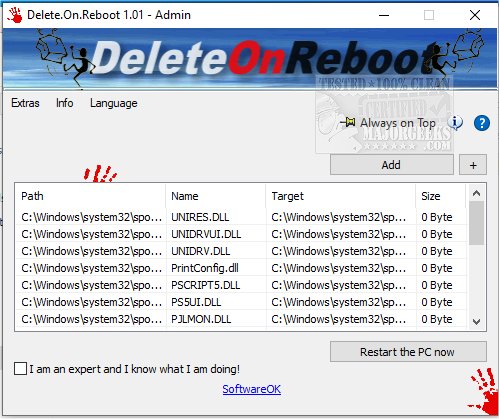
Delete.On.Reboot is a highly effective application designed to help users delete non-erasable files, directories, and subfolders during the Windows restart process. This tool is particularly useful when conventional deletion methods are unsuccessful. Unlike the more aggressive file deletion tools like ThisIsMyFile, Delete.On.Reboot utilizes a standard deletion method provided by Microsoft across all Windows operating systems. Users have the option to move files to a designated directory for further inspection, allowing them to identify potentially problematic files before permanent deletion.
One of the standout features of Delete.On.Reboot is its security warning system. This feature alerts users if they are about to delete files or folders that could lead to system instability or crashes, providing an additional layer of caution and control.
Key Features of Delete.On.Reboot:
- Administrative Explorer for enhanced file management
- A version of Administrative Explorer with System Rights
- Capability to move and delete files upon system restart
- Functionality to remove standard Windows delete jobs
For those encountering access issues or errors while attempting to delete files or folders, similar resources and guides, such as instructions on taking full ownership of files and folders, can be beneficial.
Extension of the Text:
Delete.On.Reboot 3.47 not only streamlines the deletion process for stubborn files but also enhances user experience through its intuitive interface and robust functionality. This version improves upon previous releases by optimizing the deletion workflow, ensuring that users can manage their files more efficiently.
In addition to its core features, Delete.On.Reboot is compatible with various versions of Windows, making it an essential tool for both casual users and IT professionals. As technology evolves, the need for reliable file management solutions becomes increasingly important, and Delete.On.Reboot addresses this need effectively.
Users are encouraged to explore the application’s capabilities, as it may assist in resolving various file management challenges that arise during regular computer usage. As data storage practices continue to grow in complexity, having an efficient tool like Delete.On.Reboot can significantly enhance productivity and system reliability
One of the standout features of Delete.On.Reboot is its security warning system. This feature alerts users if they are about to delete files or folders that could lead to system instability or crashes, providing an additional layer of caution and control.
Key Features of Delete.On.Reboot:
- Administrative Explorer for enhanced file management
- A version of Administrative Explorer with System Rights
- Capability to move and delete files upon system restart
- Functionality to remove standard Windows delete jobs
For those encountering access issues or errors while attempting to delete files or folders, similar resources and guides, such as instructions on taking full ownership of files and folders, can be beneficial.
Extension of the Text:
Delete.On.Reboot 3.47 not only streamlines the deletion process for stubborn files but also enhances user experience through its intuitive interface and robust functionality. This version improves upon previous releases by optimizing the deletion workflow, ensuring that users can manage their files more efficiently.
In addition to its core features, Delete.On.Reboot is compatible with various versions of Windows, making it an essential tool for both casual users and IT professionals. As technology evolves, the need for reliable file management solutions becomes increasingly important, and Delete.On.Reboot addresses this need effectively.
Users are encouraged to explore the application’s capabilities, as it may assist in resolving various file management challenges that arise during regular computer usage. As data storage practices continue to grow in complexity, having an efficient tool like Delete.On.Reboot can significantly enhance productivity and system reliability
Delete.On.Reboot 3.47 released
Delete.On.Reboot is a simple but powerful option for deleting non-erasable files, directories, subfolders upon Windows restart.