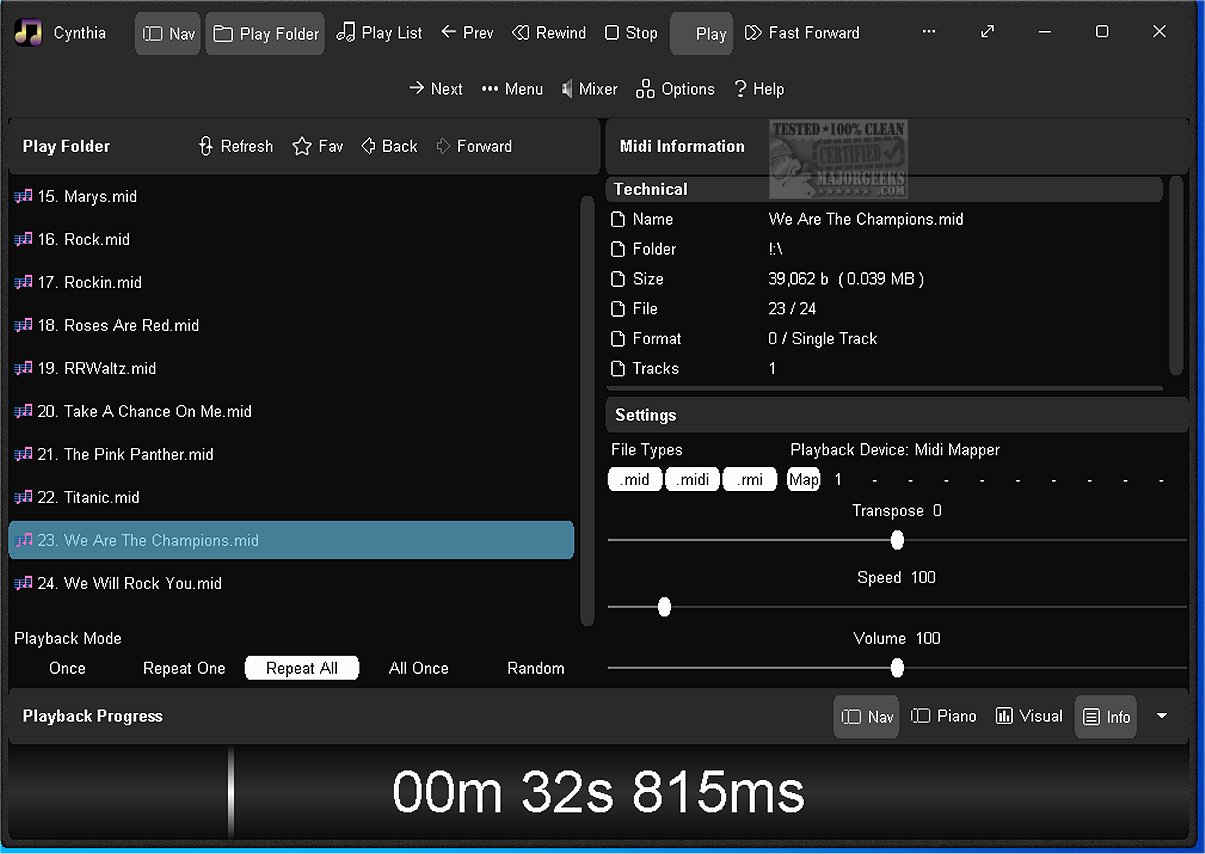
Cynthia is a user-friendly audio application specifically designed for the seamless playback of MIDI music files. It supports a variety of sources, including designated folders for MIDI files, TEP image folders, and curated playlists in .m3u format, referred to as notes20.
Key Features and Usability:
Cynthia allows users to easily manage playback settings such as speed, volume, and output devices while music is playing, ensuring a personalized listening experience. Its interface is designed for ease of use, featuring a large playback progress bar that facilitates straightforward navigation through tracks.
The app is compatible with multiple MIDI file formats (.mid, .midi, .rmi) and supports both single-track (Format 0) and multi-track (Format 1) files. To help users get started, Cynthia comes pre-loaded with 24 sample MIDI files, offering a diverse selection for immediate enjoyment.
Customizability and Additional Functionality:
Cynthia emphasizes customization, allowing users to modify the interface according to their preferences with various themes, color changes, and font modifications. It also provides detailed information about each audio file, including format, playback status, and speed.
Innovative Playback Options:
The application supports dual play systems—Play Folder and Play List—and offers multiple playback modes such as Repeat One, Repeat All, and Random. Users can also adjust playback speed from 10% to 1,000%, and employ features like Auto Fade In to smooth out abrupt sounds.
Advanced Features Include:
- A comprehensive Tracks Panel and Channels Panel for real-time data indicators and volume control.
- A scrolling lyrics viewer for a more immersive experience.
- A Piano Panel that displays real-time keystrokes on a customizable keyboard layout.
- Xbox Controller compatibility for easy navigation and control over playback functions.
- Options to switch between multiple MIDI playback devices and support for large libraries.
Conclusion:
Cynthia stands out as an innovative MIDI player that caters to both casual listeners and musicians. While it does not support popular formats like .mp3, its focus on MIDI playback makes it a unique tool for enthusiasts. With its extensive feature set and customization options, Cynthia allows users to create tailored soundscapes, enhancing their overall music experience.
Future Enhancements:
As Cynthia continues to evolve, there may be opportunities for incorporating more audio formats, enhancing its compatibility with contemporary music files. Additionally, expanding its community features could further enrich user engagement, allowing for sharing playlists and discovering new MIDI compositions
Key Features and Usability:
Cynthia allows users to easily manage playback settings such as speed, volume, and output devices while music is playing, ensuring a personalized listening experience. Its interface is designed for ease of use, featuring a large playback progress bar that facilitates straightforward navigation through tracks.
The app is compatible with multiple MIDI file formats (.mid, .midi, .rmi) and supports both single-track (Format 0) and multi-track (Format 1) files. To help users get started, Cynthia comes pre-loaded with 24 sample MIDI files, offering a diverse selection for immediate enjoyment.
Customizability and Additional Functionality:
Cynthia emphasizes customization, allowing users to modify the interface according to their preferences with various themes, color changes, and font modifications. It also provides detailed information about each audio file, including format, playback status, and speed.
Innovative Playback Options:
The application supports dual play systems—Play Folder and Play List—and offers multiple playback modes such as Repeat One, Repeat All, and Random. Users can also adjust playback speed from 10% to 1,000%, and employ features like Auto Fade In to smooth out abrupt sounds.
Advanced Features Include:
- A comprehensive Tracks Panel and Channels Panel for real-time data indicators and volume control.
- A scrolling lyrics viewer for a more immersive experience.
- A Piano Panel that displays real-time keystrokes on a customizable keyboard layout.
- Xbox Controller compatibility for easy navigation and control over playback functions.
- Options to switch between multiple MIDI playback devices and support for large libraries.
Conclusion:
Cynthia stands out as an innovative MIDI player that caters to both casual listeners and musicians. While it does not support popular formats like .mp3, its focus on MIDI playback makes it a unique tool for enthusiasts. With its extensive feature set and customization options, Cynthia allows users to create tailored soundscapes, enhancing their overall music experience.
Future Enhancements:
As Cynthia continues to evolve, there may be opportunities for incorporating more audio formats, enhancing its compatibility with contemporary music files. Additionally, expanding its community features could further enrich user engagement, allowing for sharing playlists and discovering new MIDI compositions
Cynthia 1.00.6187 released
Cynthia is an intuitive audio app designed to effortlessly play MIDI music files from various sources, including a designated folder containing your MIDI files, a TEP image folder, or a curated playlist in .m3u format known as notes20.