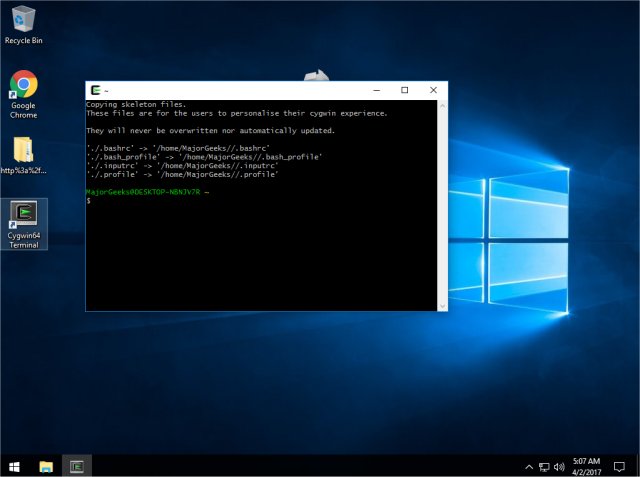
Cygwin 3.6.7 has been released, continuing its mission to provide Windows users with a Linux-like environment through a comprehensive selection of precompiled applications. It features an installer that ensures users have the latest version of the software. However, it is important to note that Cygwin is not a replacement for the Windows operating system or its shell; instead, it offers a terminal interface for executing Linux commands. This makes it relatively safe to install without risking damage to the Windows system, although creating a full backup image is recommended as a precaution.
For those new to Linux, Cygwin's interface may resemble a DOS prompt rather than the graphical experience associated with Linux distributions. Familiarity with Linux or DOS commands can be beneficial for navigating this environment. It's essential to understand that Cygwin does not support running native Linux applications directly. Users must either recompile applications or download from the extensive package repository available during installation. If Cygwin is already installed, users can simply reinstall it and select additional packages through the installer interface.
However, users have reported challenges when attempting to run Cygwin in virtual machines, such as issues with the VMWare video adapter. This limitation is a notable drawback for those intending to use Cygwin in virtualized environments. Despite these challenges, Cygwin fulfills its promise of providing a Linux-like experience, albeit without the graphical user interface commonly found in many Linux distributions. For support, users can refer to the FAQ and user guides available on the Cygwin website.
In summary, Cygwin is a valuable tool for Windows users looking to experiment with Linux commands in a familiar environment. While it offers a safe way to explore Linux functionalities, users may ultimately find they appreciate the features of Windows 10 or 11 after their experience with Cygwin. Future improvements could include better support for virtual machines and enhanced GUI capabilities to further bridge the gap between Linux and Windows environments
For those new to Linux, Cygwin's interface may resemble a DOS prompt rather than the graphical experience associated with Linux distributions. Familiarity with Linux or DOS commands can be beneficial for navigating this environment. It's essential to understand that Cygwin does not support running native Linux applications directly. Users must either recompile applications or download from the extensive package repository available during installation. If Cygwin is already installed, users can simply reinstall it and select additional packages through the installer interface.
However, users have reported challenges when attempting to run Cygwin in virtual machines, such as issues with the VMWare video adapter. This limitation is a notable drawback for those intending to use Cygwin in virtualized environments. Despite these challenges, Cygwin fulfills its promise of providing a Linux-like experience, albeit without the graphical user interface commonly found in many Linux distributions. For support, users can refer to the FAQ and user guides available on the Cygwin website.
In summary, Cygwin is a valuable tool for Windows users looking to experiment with Linux commands in a familiar environment. While it offers a safe way to explore Linux functionalities, users may ultimately find they appreciate the features of Windows 10 or 11 after their experience with Cygwin. Future improvements could include better support for virtual machines and enhanced GUI capabilities to further bridge the gap between Linux and Windows environments
Cygwin 3.6.7 released
Cygwin is designed to provide functionality similar to a Linux distribution on Windows with a large selection of precompiled apps.