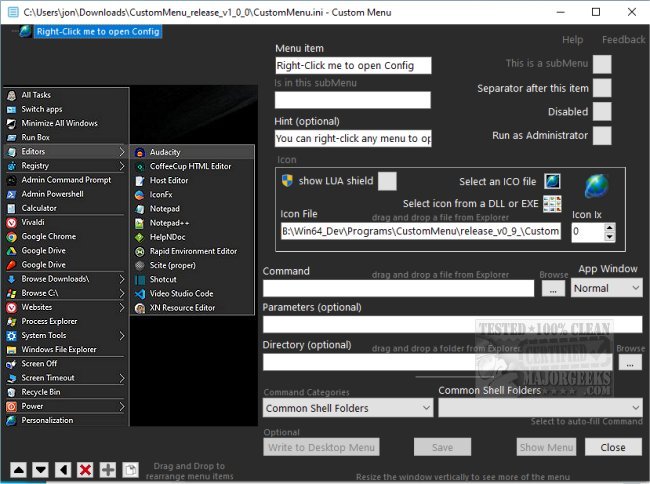
CustomMenu version 2.0.3 has been released, offering users an innovative way to personalize their Windows desktop experience. This application allows you to create a custom desktop menu with multiple submenus, enabling you to organize your preferred applications, folders, Windows settings, and applets in one accessible location. By simply right-clicking on the desktop, users can quickly access their customized menu, which aims to replace the standard Windows menu with a more user-friendly interface.
One of the standout features of CustomMenu is its ability to include a dedicated list of applications, addressing the common issue where portable versions of programs may not be easily found using the Windows key. Additionally, if users need to revert to the original Windows menu, they can do so by holding the Control key while right-clicking, allowing for a seamless experience without losing the benefits of the custom menu.
The settings panel provides further customization options, allowing users to edit program titles and add personalized hints that appear upon hovering over items. This feature is particularly useful for understanding the functionalities of newly installed tools. Users can also create tailored sub-menus based on their workflows, such as categories for gaming, work, or entertainment, resulting in a cleaner and more organized menu.
CustomMenu significantly enhances the user experience by streamlining access to frequently used settings and applications, ultimately reducing the frustration often associated with navigating the default Windows Start Menu and desktop context menu. This tool is a valuable asset for anyone looking to declutter their digital workspace and improve efficiency.
In future updates, CustomMenu could consider adding features such as cloud synchronization for menu settings across multiple devices, enhanced search capabilities to quickly find items within the menu, and integration with third-party applications. Furthermore, incorporating themes and visual customization options could provide users with an even more personalized interface. As more users seek tailored solutions for their computing environments, CustomMenu is well-positioned to become an essential tool for optimizing the Windows experience
One of the standout features of CustomMenu is its ability to include a dedicated list of applications, addressing the common issue where portable versions of programs may not be easily found using the Windows key. Additionally, if users need to revert to the original Windows menu, they can do so by holding the Control key while right-clicking, allowing for a seamless experience without losing the benefits of the custom menu.
The settings panel provides further customization options, allowing users to edit program titles and add personalized hints that appear upon hovering over items. This feature is particularly useful for understanding the functionalities of newly installed tools. Users can also create tailored sub-menus based on their workflows, such as categories for gaming, work, or entertainment, resulting in a cleaner and more organized menu.
CustomMenu significantly enhances the user experience by streamlining access to frequently used settings and applications, ultimately reducing the frustration often associated with navigating the default Windows Start Menu and desktop context menu. This tool is a valuable asset for anyone looking to declutter their digital workspace and improve efficiency.
Extended Functionality and Future Updates
In future updates, CustomMenu could consider adding features such as cloud synchronization for menu settings across multiple devices, enhanced search capabilities to quickly find items within the menu, and integration with third-party applications. Furthermore, incorporating themes and visual customization options could provide users with an even more personalized interface. As more users seek tailored solutions for their computing environments, CustomMenu is well-positioned to become an essential tool for optimizing the Windows experience
CustomMenu 2.0.3 released
CustomMenu gives you the freedom to create your personalized Windows desktop menu.