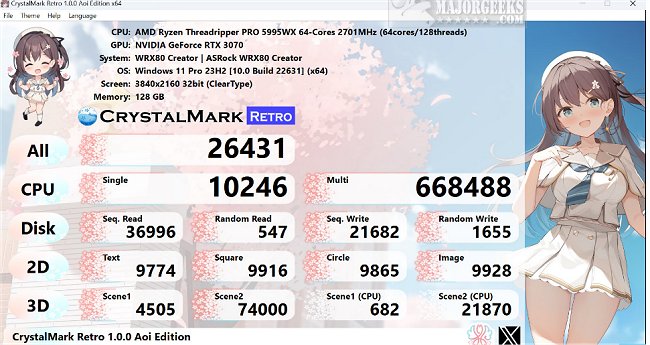
CrystalMark Retro 2.0.7 has been released, providing users with a comprehensive tool to evaluate the performance of their hard drives. This software includes a portable version and a beta option for those looking to test new features. It measures both sequential and random read/write speeds, offering valuable insights into the overall performance and efficiency of hard drives. These measurements help users pinpoint areas that may need improvement.
In addition to disk performance, CrystalMark Retro assesses CPU performance, 2D graphics (GDI), and 3D graphics (OpenGL), all within 64-bit (x64/ARM64) systems and in more than 48 languages. This versatility makes it an accessible tool for a wide range of users.
Key features of CrystalMark Retro include:
- Measurement of sequential and random read/write speeds
- Option to select test data
- Theme customization support
- Multi-language support
- CPU benchmarking
- Storage benchmarking
- 2D and 3D graphics benchmarking
The tool is designed to provide accurate data, enabling users to optimize their computer systems effectively.
For those interested in maintaining their hard drives, resources on checking hard disk health using WMIC, finding hard drive serial numbers, and general computer benchmarking are also available. This makes CrystalMark Retro not just a performance evaluation tool, but also a part of a broader toolkit for computer system optimization and maintenance
In addition to disk performance, CrystalMark Retro assesses CPU performance, 2D graphics (GDI), and 3D graphics (OpenGL), all within 64-bit (x64/ARM64) systems and in more than 48 languages. This versatility makes it an accessible tool for a wide range of users.
Key features of CrystalMark Retro include:
- Measurement of sequential and random read/write speeds
- Option to select test data
- Theme customization support
- Multi-language support
- CPU benchmarking
- Storage benchmarking
- 2D and 3D graphics benchmarking
The tool is designed to provide accurate data, enabling users to optimize their computer systems effectively.
For those interested in maintaining their hard drives, resources on checking hard disk health using WMIC, finding hard drive serial numbers, and general computer benchmarking are also available. This makes CrystalMark Retro not just a performance evaluation tool, but also a part of a broader toolkit for computer system optimization and maintenance
CrystalMark Retro 2.0.7 released
CrystalMark Retro allows you to evaluate the performance of your hard drives thoroughly. A portable version and the current Beta are also available.