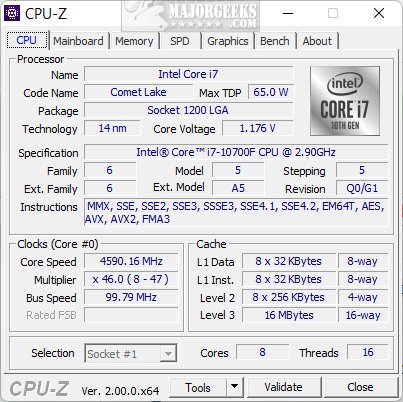
CPU-Z, a free utility from CPUID, has launched its latest version, 2.19, offering users an in-depth look at their computer's hardware. Whether you're a PC enthusiast, a performance junkie, or just the go-to tech support for friends and family, understanding your system's components is essential. CPU-Z simplifies this process, providing detailed specifications without the need for any technical disassembly.
2. Motherboard Specifications: Identify your motherboard's manufacturer, model, and chipset for compatibility and updates.
3. Memory Insights: Information on RAM type, size, and speed, aiding in upgrades and performance checks.
4. Graphics Card Information: Basic specs for integrated or discrete GPUs, useful for troubleshooting and building PCs.
5. Real-Time Monitoring: Track CPU frequencies, voltages, and utilization, ideal for overclockers.
6. Benchmarking Tool: Lightweight benchmarking options for performance evaluation.
7. Report Generation: Export data to text files for easy sharing or documentation.
For Overclocking: It provides real-time monitoring of CPU parameters, helping ensure stable performance.
For Troubleshooting: The tool aids in identifying performance issues or potential hardware failures.
For Documentation: Users can easily export system reports, making it practical for upgrades or client assistance.
- Three Ways to Find Out How Many Cores Your CPU has
- How to Identify My Intel Processor and Generation
- How to Check Your Memory (RAM) Speed, Available Slots, and More
- How to Identify the Hardware in Your Computer
In summary, CPU-Z is not just a utility; it’s your reliable partner in navigating the complex world of PC hardware
Why Choose CPU-Z?
CPU-Z is trusted by users for its accuracy and ease of use. It answers critical questions about your system, such as the type of processor installed, RAM specifications, and real-time performance metrics. This tool allows you to get all the necessary data quickly and efficiently, eliminating the hassle of manual checks.Key Features
1. Processor Information: Vital details about your CPU, including core count, clock speeds, and cache sizes.2. Motherboard Specifications: Identify your motherboard's manufacturer, model, and chipset for compatibility and updates.
3. Memory Insights: Information on RAM type, size, and speed, aiding in upgrades and performance checks.
4. Graphics Card Information: Basic specs for integrated or discrete GPUs, useful for troubleshooting and building PCs.
5. Real-Time Monitoring: Track CPU frequencies, voltages, and utilization, ideal for overclockers.
6. Benchmarking Tool: Lightweight benchmarking options for performance evaluation.
7. Report Generation: Export data to text files for easy sharing or documentation.
Portability and Customization
The utility comes in a portable version that requires no installation, making it easy to use on various machines via USB drives. While it supports Windows and Android, Mac users currently lack compatibility. Users can customize settings to adjust display options to their preferences, enhancing the user experience.Problem Solving Capabilities
For Hardware Upgrades: CPU-Z helps identify necessary components before purchases, ensuring compatibility.For Overclocking: It provides real-time monitoring of CPU parameters, helping ensure stable performance.
For Troubleshooting: The tool aids in identifying performance issues or potential hardware failures.
For Documentation: Users can easily export system reports, making it practical for upgrades or client assistance.
Conclusion
CPU-Z is an essential tool for anyone serious about understanding their PC's hardware. Its combination of power, simplicity, and resource efficiency makes it a must-have for both casual users and tech enthusiasts alike. With its free availability and comprehensive features, CPU-Z is a valuable addition to your tech toolkit. If you're looking to demystify your computer's internals or enhance its performance, downloading CPU-Z is a decision you won't regret.Additional Resources
- How to Find Motherboard Manufacturer, Model, Serial Number, and Version- Three Ways to Find Out How Many Cores Your CPU has
- How to Identify My Intel Processor and Generation
- How to Check Your Memory (RAM) Speed, Available Slots, and More
- How to Identify the Hardware in Your Computer
In summary, CPU-Z is not just a utility; it’s your reliable partner in navigating the complex world of PC hardware
CPU-Z 2.19 released
CPU-Z is a free utility from CPUID that provides detailed information about your computer's hardware.