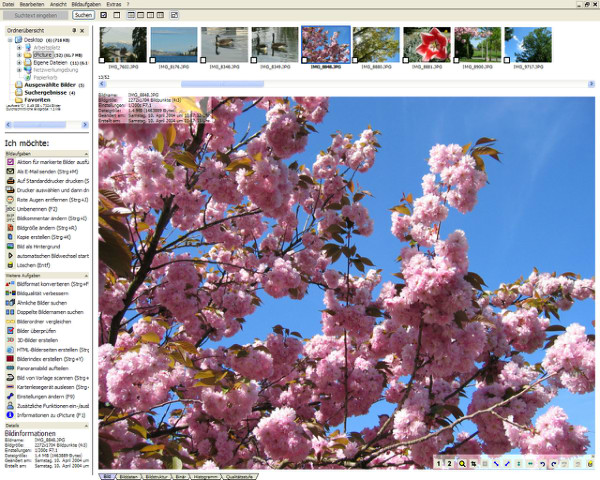
cPicture LE 4.9 has been released, introducing a comprehensive software suite designed to enhance your digital picture workflow. This user-friendly software does not require a database or installation, making it accessible and easy to use. Unlike other programs, cPicture does not interfere with existing picture or RAW libraries on your system.
cPicture stands out as a leading tool for lossless cropping of JPEG images. It offers features such as universal index prints for easy review, fast search options, the ability to add comments, and seamless browsing through your photo collection. Additionally, users can enjoy their videos in a 16:9 aspect ratio. To get started with cPicture, simply copy the current version of the application to your device.
For those looking to optimize their experience with photo management on Windows 10 and 11, there are various resources available. These include guides on restoring the Windows Photo Viewer, adding or removing folders in the Photos app, managing notifications, and adjusting context menu options.
In summary, cPicture LE 4.9 is an efficient and straightforward solution for managing digital images without the complications of traditional software installations. Its lossless cropping feature, alongside a variety of organizational tools, makes it a valuable asset for photographers and casual users alike. Moving forward, users may anticipate further updates and features that enhance their digital image workflow experience
cPicture stands out as a leading tool for lossless cropping of JPEG images. It offers features such as universal index prints for easy review, fast search options, the ability to add comments, and seamless browsing through your photo collection. Additionally, users can enjoy their videos in a 16:9 aspect ratio. To get started with cPicture, simply copy the current version of the application to your device.
For those looking to optimize their experience with photo management on Windows 10 and 11, there are various resources available. These include guides on restoring the Windows Photo Viewer, adding or removing folders in the Photos app, managing notifications, and adjusting context menu options.
In summary, cPicture LE 4.9 is an efficient and straightforward solution for managing digital images without the complications of traditional software installations. Its lossless cropping feature, alongside a variety of organizational tools, makes it a valuable asset for photographers and casual users alike. Moving forward, users may anticipate further updates and features that enhance their digital image workflow experience
cPicture LE 4.9 released
cPicture is a modern all-in-one software suite to support your digital picture workflow. Very easy and without a database or installation.