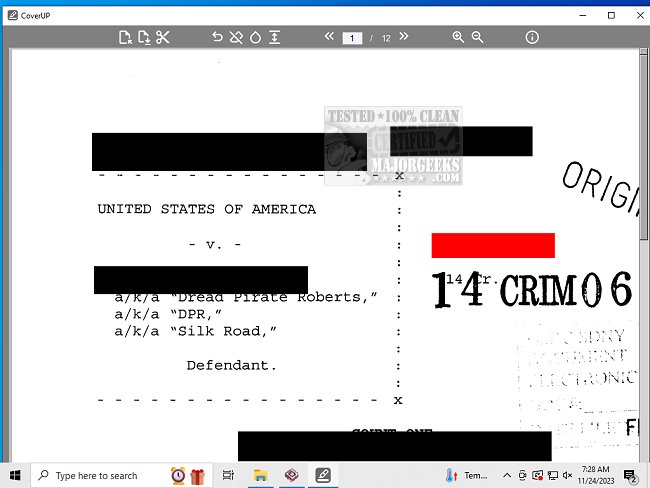
CoverUP has recently released version 0.4.2 and 0.3.0, offering users a streamlined and secure method for redacting sensitive information in PDF files. This application allows users to effectively conceal text passages by overlaying them with black or white bars, providing a professional finish without the hassle of manual editing or ineffective redaction methods.
Upon importing PDF documents into CoverUP, they are converted into images, which enhances security by preventing the text from being copied or indexed without Optical Character Recognition (OCR). This feature ensures that confidential information remains protected. Users can easily cover sensitive details using a drag-and-drop interface to create rectangles or bars, although customization options are limited to black and white.
In addition to supporting PDF files, CoverUP also allows the importation of PNG and JPG files. Users can choose between two modes for document conversion: a high-quality mode that preserves visual integrity and a compressed mode that reduces file size, albeit with some loss in quality. This flexibility makes CoverUP an ideal tool for redacting information from both single pages and entire documents.
Overall, CoverUP presents a versatile, user-friendly, and secure solution for managing PDF redactions, ensuring that sensitive information is handled with care.
In addition to its core functionalities, future updates could potentially include more customization options for the redaction bars, such as different colors or patterns. Furthermore, an OCR feature could be integrated to allow users to search for and redact specific phrases or keywords, enhancing overall efficiency. Additionally, a cloud-based version of the application might provide users with the convenience of accessing their work from multiple devices, further improving the user experience. Overall, CoverUP is positioned as a reliable tool for anyone needing to manage sensitive documents effectively and professionally
Upon importing PDF documents into CoverUP, they are converted into images, which enhances security by preventing the text from being copied or indexed without Optical Character Recognition (OCR). This feature ensures that confidential information remains protected. Users can easily cover sensitive details using a drag-and-drop interface to create rectangles or bars, although customization options are limited to black and white.
In addition to supporting PDF files, CoverUP also allows the importation of PNG and JPG files. Users can choose between two modes for document conversion: a high-quality mode that preserves visual integrity and a compressed mode that reduces file size, albeit with some loss in quality. This flexibility makes CoverUP an ideal tool for redacting information from both single pages and entire documents.
Overall, CoverUP presents a versatile, user-friendly, and secure solution for managing PDF redactions, ensuring that sensitive information is handled with care.
In addition to its core functionalities, future updates could potentially include more customization options for the redaction bars, such as different colors or patterns. Furthermore, an OCR feature could be integrated to allow users to search for and redact specific phrases or keywords, enhancing overall efficiency. Additionally, a cloud-based version of the application might provide users with the convenience of accessing their work from multiple devices, further improving the user experience. Overall, CoverUP is positioned as a reliable tool for anyone needing to manage sensitive documents effectively and professionally
CoverUP 0.4.2/ 0.3.0 released
CoverUP offers a secure and easy-to-use solution for redacting your PDF files.