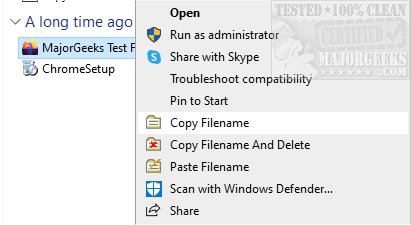
The latest version of CopyFilenames, 4.5, has just been released, enhancing the efficiency of file name management directly from the Windows File Explorer context menu. This intuitive application streamlines the process of copying and deleting file names, significantly reducing the time spent on these tasks and minimizing the potential for errors.
With CopyFilenames, users can easily add several commands to the right-click context menu, enabling quick access to file names for pasting into various applications. A notable feature is the ability to copy the full path of a file by holding down the SHIFT key while selecting the Copy Filenames command. This is particularly useful for referencing files in documents or applications that require file paths.
Additionally, CopyFilenames allows users to include file size and last-modified date when copying file information. By holding the CTRL key while invoking the command, an options panel appears, offering flexibility in how file information is copied. This tool is especially beneficial for developers, technical authors, and systems administrators who frequently manage file systems.
Key Features of CopyFilenames 4.5:
- Copy one or multiple file or folder names as text to the clipboard.
- Options to include file size and date/time.
- Ability to copy the full path with options for formatting, including doubling backslashes or using forward slashes.
- Customization options for quoting filenames with single or double quotes.
- Versatile separation of multiple filenames with newline, space, tab, or comma.
- Rename files using text from the clipboard with the "Paste Filename" command.
- A convenient command to copy a filename and delete the file in one step.
This latest release of CopyFilenames not only enhances productivity but also provides invaluable tools for effective file management. Users can leverage this powerful application to optimize their workflow and ensure a seamless experience when handling files.
Future Enhancements:
Looking ahead, there may be further enhancements to CopyFilenames, such as integration with cloud storage services, improved user interface customization, and advanced file sorting options. These potential upgrades would expand its utility, making it an even more indispensable tool for users managing extensive file systems.
In summary, CopyFilenames 4.5 is a must-have tool for anyone looking to enhance their file management capabilities within Windows, offering user-friendly features that cater to a variety of needs
With CopyFilenames, users can easily add several commands to the right-click context menu, enabling quick access to file names for pasting into various applications. A notable feature is the ability to copy the full path of a file by holding down the SHIFT key while selecting the Copy Filenames command. This is particularly useful for referencing files in documents or applications that require file paths.
Additionally, CopyFilenames allows users to include file size and last-modified date when copying file information. By holding the CTRL key while invoking the command, an options panel appears, offering flexibility in how file information is copied. This tool is especially beneficial for developers, technical authors, and systems administrators who frequently manage file systems.
Key Features of CopyFilenames 4.5:
- Copy one or multiple file or folder names as text to the clipboard.
- Options to include file size and date/time.
- Ability to copy the full path with options for formatting, including doubling backslashes or using forward slashes.
- Customization options for quoting filenames with single or double quotes.
- Versatile separation of multiple filenames with newline, space, tab, or comma.
- Rename files using text from the clipboard with the "Paste Filename" command.
- A convenient command to copy a filename and delete the file in one step.
This latest release of CopyFilenames not only enhances productivity but also provides invaluable tools for effective file management. Users can leverage this powerful application to optimize their workflow and ensure a seamless experience when handling files.
Future Enhancements:
Looking ahead, there may be further enhancements to CopyFilenames, such as integration with cloud storage services, improved user interface customization, and advanced file sorting options. These potential upgrades would expand its utility, making it an even more indispensable tool for users managing extensive file systems.
In summary, CopyFilenames 4.5 is a must-have tool for anyone looking to enhance their file management capabilities within Windows, offering user-friendly features that cater to a variety of needs
CopyFilenames 4.5 released
CopyFilenames allows efficient file name copying and deleting directly from the right-click context menu.