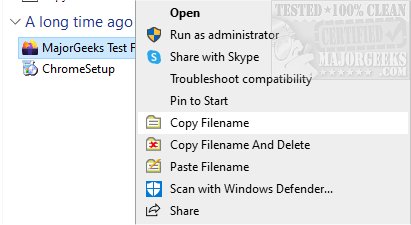
CopyFilenames is a powerful utility designed to enhance file management by allowing users to efficiently copy and delete file names directly from the right-click context menu in Windows File Explorer. This tool is particularly useful for individuals who frequently need to reference file names in documents, as it simplifies the process of obtaining file information.
With the new version 4.3, CopyFilenames introduces a variety of features that improve the user experience. Users can quickly copy one or multiple file or folder names to the Windows clipboard, with options to include additional details such as file size and last-modified date. By holding down the SHIFT key when selecting the Copy Filenames command, users can also copy the full path of a file, which can be pasted into applications that require file paths.
Moreover, the application offers customizable options, such as formatting the copied paths with double backslashes or forward slashes, enclosing file names in single or double quotes, and choosing how multiple filenames are separated (by newline, space, tab, or comma). Users can also rename files using the contents of the clipboard through the "Paste Filename" command, as well as copy and delete files in a single action.
This tool is especially beneficial for developers, technical authors, and systems administrators who require efficient file management capabilities. CopyFilenames significantly reduces the potential for errors while saving time, making it an invaluable addition to any professional’s toolkit.
Future Improvements and Extensions:
Looking ahead, future versions of CopyFilenames could include enhanced integration with cloud storage services, enabling users to manage files across different platforms seamlessly. Additionally, implementing batch processing capabilities could allow users to execute multiple operations simultaneously, further increasing efficiency. Features like customizable keyboard shortcuts and improved user interface options could also be explored to enhance usability and accessibility for a broader audience
With the new version 4.3, CopyFilenames introduces a variety of features that improve the user experience. Users can quickly copy one or multiple file or folder names to the Windows clipboard, with options to include additional details such as file size and last-modified date. By holding down the SHIFT key when selecting the Copy Filenames command, users can also copy the full path of a file, which can be pasted into applications that require file paths.
Moreover, the application offers customizable options, such as formatting the copied paths with double backslashes or forward slashes, enclosing file names in single or double quotes, and choosing how multiple filenames are separated (by newline, space, tab, or comma). Users can also rename files using the contents of the clipboard through the "Paste Filename" command, as well as copy and delete files in a single action.
This tool is especially beneficial for developers, technical authors, and systems administrators who require efficient file management capabilities. CopyFilenames significantly reduces the potential for errors while saving time, making it an invaluable addition to any professional’s toolkit.
Future Improvements and Extensions:
Looking ahead, future versions of CopyFilenames could include enhanced integration with cloud storage services, enabling users to manage files across different platforms seamlessly. Additionally, implementing batch processing capabilities could allow users to execute multiple operations simultaneously, further increasing efficiency. Features like customizable keyboard shortcuts and improved user interface options could also be explored to enhance usability and accessibility for a broader audience
CopyFilenames 4.3 released
CopyFilenames allows efficient file name copying and deleting directly from the right-click context menu.