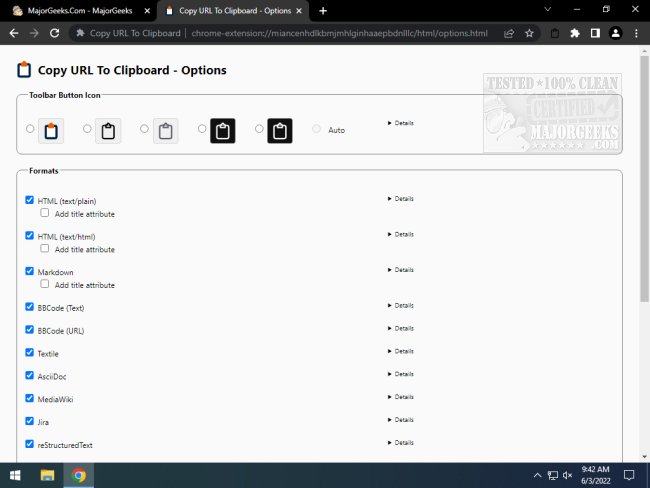
The latest version of the Copy URL To Clipboard extension for Chrome and Firefox, 15.1.0, has been released, enhancing the functionality for users who frequently work with URLs. This extension allows users to not only copy URLs but also edit them, supporting a variety of formats such as HTML, Markdown, BBCode, Textile, AsciiDoc, MediaWiki, Jira, reStructuredText, LaTeX, Org Mode, and plain Text.
Users can easily copy links from any open tab using a convenient context menu, a dedicated tool button, or keyboard shortcuts. The process is straightforward: simply right-click on the webpage, select the desired format for the URL, and if any text is highlighted beforehand, it will automatically serve as the link content. This tool offers an efficient method for gathering and organizing URLs from multiple tabs, making it easier to paste them into other applications or documents.
Additionally, the extension contributes to improved productivity by streamlining the process of managing URLs. Users can benefit from quick access to their preferred formats and can customize how they share links depending on their needs. This release also fits into a broader context of user interface enhancements, as seen in related guides on managing context menus in Windows 10 and 11, allowing for a more tailored user experience.
In summary, Copy URL To Clipboard 15.1.0 is a versatile tool for anyone who needs to manage URLs efficiently across different formats and platforms. It simplifies the process of copying and editing links, ultimately saving time and enhancing workflow
Users can easily copy links from any open tab using a convenient context menu, a dedicated tool button, or keyboard shortcuts. The process is straightforward: simply right-click on the webpage, select the desired format for the URL, and if any text is highlighted beforehand, it will automatically serve as the link content. This tool offers an efficient method for gathering and organizing URLs from multiple tabs, making it easier to paste them into other applications or documents.
Additionally, the extension contributes to improved productivity by streamlining the process of managing URLs. Users can benefit from quick access to their preferred formats and can customize how they share links depending on their needs. This release also fits into a broader context of user interface enhancements, as seen in related guides on managing context menus in Windows 10 and 11, allowing for a more tailored user experience.
In summary, Copy URL To Clipboard 15.1.0 is a versatile tool for anyone who needs to manage URLs efficiently across different formats and platforms. It simplifies the process of copying and editing links, ultimately saving time and enhancing workflow
Copy URL To Clipboard for Chrome and Firefox 15.1.0 released
Copy URL To Clipboard for Chrome and Firefox allows you to copy and edit URLs.
Copy URL To Clipboard for Chrome and Firefox 15.1.0 released @ MajorGeeks