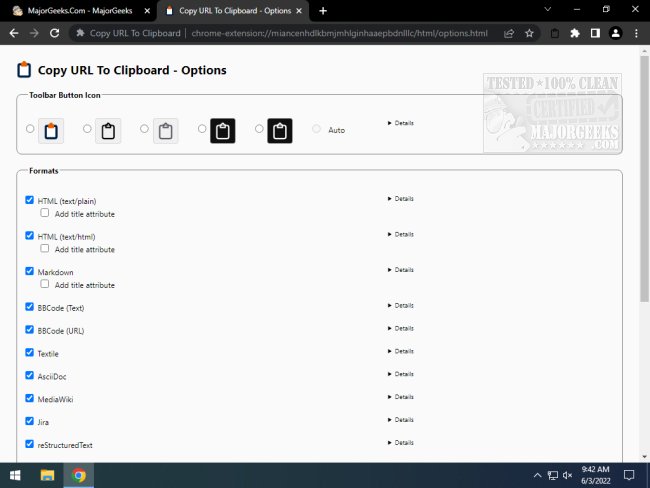
The recently released version 14.3.4 of the "Copy URL To Clipboard" extension for Chrome and Firefox enhances users' ability to copy and edit URLs efficiently. This tool supports copying links in various formats, including HTML, Markdown, BBCode, Textile, AsciiDoc, MediaWiki, Jira, reStructuredText, LaTeX, Org Mode, and plain Text. Users can effortlessly copy URLs from any open tab using the context menu, a dedicated tool button, or keyboard shortcuts.
When copying a URL, users can right-click on the webpage, select the desired format from the context menu, and if text is highlighted, that text will be used as the link's content. This functionality makes it easy to gather and edit URLs for use in different applications or documentation.
In addition to its core features, the extension could benefit from additional capabilities, such as integrating with cloud storage services for saving links directly, enabling users to organize copied URLs into folders, or providing a history of copied links for easy retrieval. Enhanced customization options for the context menu and the ability to share links directly via social media platforms could also improve user experience. Overall, "Copy URL To Clipboard" serves as a powerful tool for users looking to streamline their workflow involving URL management
When copying a URL, users can right-click on the webpage, select the desired format from the context menu, and if text is highlighted, that text will be used as the link's content. This functionality makes it easy to gather and edit URLs for use in different applications or documentation.
In addition to its core features, the extension could benefit from additional capabilities, such as integrating with cloud storage services for saving links directly, enabling users to organize copied URLs into folders, or providing a history of copied links for easy retrieval. Enhanced customization options for the context menu and the ability to share links directly via social media platforms could also improve user experience. Overall, "Copy URL To Clipboard" serves as a powerful tool for users looking to streamline their workflow involving URL management
Copy URL To Clipboard for Chrome and Firefox 14.3.4 released
Copy URL To Clipboard for Chrome and Firefox allows you to copy and edit URLs.
Copy URL To Clipboard for Chrome and Firefox 14.3.4 released @ MajorGeeks