Coodesker version 1.1.0.4 has been released, offering users a streamlined way to organize their desktop items into tidy boxes. This application allows you to not only manually place items into designated boxes but also provides an "Organize Desktop" feature that automatically sorts and arranges desktop items for you. Once items are organized into boxes, users have the flexibility to choose between large or small display options, name their boxes, or disband them to return items to a free-range mode.
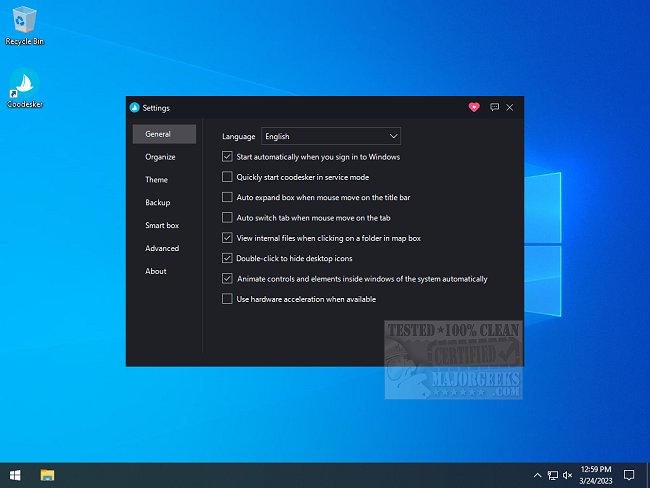
The settings display is user-friendly and offers various customization options, including starting with Windows, enabling service mode, and utilizing hardware acceleration. Each box is resizable, allowing for personalization based on the contents, and users can even change themes or add background images for a unique touch. The software also includes a backup feature to save preferred layouts, ensuring that users can easily restore their organization after changes.
A comprehensive usage guide is available on the author’s website for those looking to maximize their experience with Coodesker. This tool is particularly beneficial for individuals who struggle with cluttered desktops, making it an essential addition for anyone with numerous desktop items.
In addition to its core features, Coodesker’s versatility means it could be further enhanced with future updates. Potential improvements could include additional themes, advanced sorting algorithms, or integration with cloud services for seamless access across multiple devices. As desktop organization becomes increasingly important in our digital lives, tools like Coodesker can provide significant value to users seeking efficiency and personalization in their workspace
The settings display is user-friendly and offers various customization options, including starting with Windows, enabling service mode, and utilizing hardware acceleration. Each box is resizable, allowing for personalization based on the contents, and users can even change themes or add background images for a unique touch. The software also includes a backup feature to save preferred layouts, ensuring that users can easily restore their organization after changes.
A comprehensive usage guide is available on the author’s website for those looking to maximize their experience with Coodesker. This tool is particularly beneficial for individuals who struggle with cluttered desktops, making it an essential addition for anyone with numerous desktop items.
In addition to its core features, Coodesker’s versatility means it could be further enhanced with future updates. Potential improvements could include additional themes, advanced sorting algorithms, or integration with cloud services for seamless access across multiple devices. As desktop organization becomes increasingly important in our digital lives, tools like Coodesker can provide significant value to users seeking efficiency and personalization in their workspace
Coodesker 1.1.0.4 released
Coodesker lets you organize all your desktop items into neat boxes.