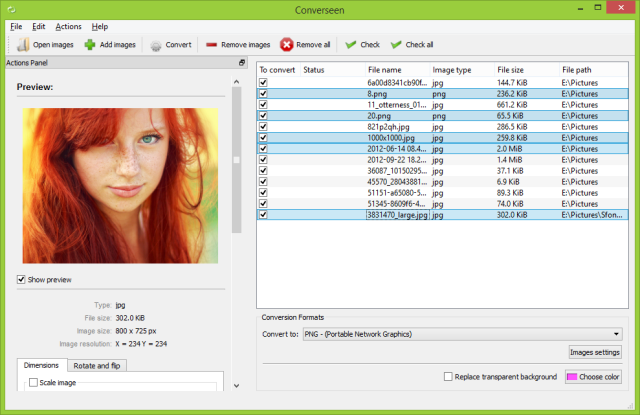
Converseen is a robust and free cross-platform batch image processing tool designed to help users manage and manipulate multiple images at once with just a single click. It also offers a 32-bit version for compatibility with older systems.
What is Converseen?
Converseen provides an efficient solution for individuals who often handle large collections of images, streamlining the editing process with a variety of essential features. One of its most notable capabilities is the conversion of entire PDF files into a range of image formats, making it suitable for both personal and professional use. With support for over 100 different image formats—including popular ones like DPX, EXR, GIF, JPEG, JPEG-2000, PNG, SVG, TIFF, WebP, and HEIC/HEIF—Converseen accommodates a wide spectrum of image-related tasks.
User-Friendly Interface
Designed with user experience in mind, Converseen boasts an intuitive interface that simplifies navigation, making it accessible even for those not well-versed in technology. The software is optimized for rapid processing speeds, which is particularly beneficial for professionals aiming for efficiency, as well as casual users seeking quick and effective image conversions.
Geek Verdict
Converseen maintains exceptional quality while preserving the integrity of original images. It features an impressive array of tools for resizing, rotating, flipping, and renaming files, establishing itself as a versatile resource for all image processing needs. Furthermore, its completely free usage makes it an invaluable asset for anyone looking to enhance their image workflow without incurring costs.
Extended Features
In addition to its core functionalities, Converseen also allows for batch processing, enabling users to apply changes to multiple images simultaneously. This feature can significantly reduce the time spent on repetitive tasks. Furthermore, the software is regularly updated, ensuring that users have access to the latest enhancements and bug fixes. The community surrounding Converseen also contributes to its development, providing feedback and feature requests that help shape future versions.
Discover the ease and efficiency of Converseen and transform your image processing tasks into a seamless experience today
What is Converseen?
Converseen provides an efficient solution for individuals who often handle large collections of images, streamlining the editing process with a variety of essential features. One of its most notable capabilities is the conversion of entire PDF files into a range of image formats, making it suitable for both personal and professional use. With support for over 100 different image formats—including popular ones like DPX, EXR, GIF, JPEG, JPEG-2000, PNG, SVG, TIFF, WebP, and HEIC/HEIF—Converseen accommodates a wide spectrum of image-related tasks.
User-Friendly Interface
Designed with user experience in mind, Converseen boasts an intuitive interface that simplifies navigation, making it accessible even for those not well-versed in technology. The software is optimized for rapid processing speeds, which is particularly beneficial for professionals aiming for efficiency, as well as casual users seeking quick and effective image conversions.
Geek Verdict
Converseen maintains exceptional quality while preserving the integrity of original images. It features an impressive array of tools for resizing, rotating, flipping, and renaming files, establishing itself as a versatile resource for all image processing needs. Furthermore, its completely free usage makes it an invaluable asset for anyone looking to enhance their image workflow without incurring costs.
Extended Features
In addition to its core functionalities, Converseen also allows for batch processing, enabling users to apply changes to multiple images simultaneously. This feature can significantly reduce the time spent on repetitive tasks. Furthermore, the software is regularly updated, ensuring that users have access to the latest enhancements and bug fixes. The community surrounding Converseen also contributes to its development, providing feedback and feature requests that help shape future versions.
Discover the ease and efficiency of Converseen and transform your image processing tasks into a seamless experience today
Converseen 0.15.2.3-1 released
Converseen is a powerful and free, cross-platform batch image processing tool that allows users to efficiently manage and manipulate multiple images simultaneously with just a single click. 32-bit is also available.