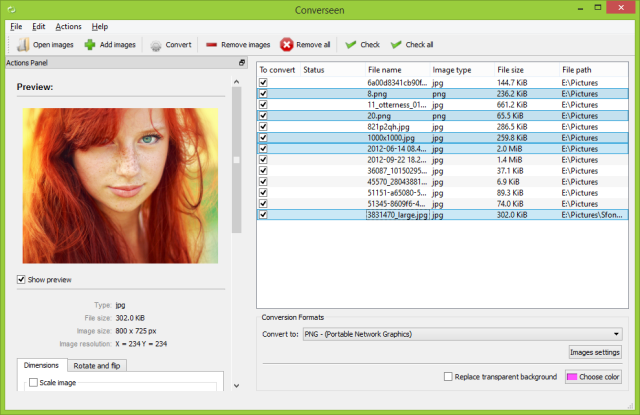
Converseen version 0.15.2.2-1 has been released, introducing users to an advanced and free batch image processing tool available across multiple platforms, including a 32-bit version. This software is designed for efficient management and manipulation of numerous images simultaneously, making it particularly beneficial for individuals who regularly handle large collections of images.
Key Features of Converseen:
1. Versatile Image Conversion: One of Converseen's hallmark features is its capability to convert entire PDF files into various image formats, which is useful for both personal and professional tasks. The software supports over 100 different image formats, including popular ones like JPEG, PNG, TIFF, and WebP, allowing for tailored image optimization based on user needs.
2. User-Friendly Interface: The software is designed with an emphasis on ease of use, featuring an intuitive interface that simplifies navigation for users of all technical backgrounds. This user-centric approach, combined with rapid processing speeds, makes Converseen an ideal choice for professionals aiming for efficiency as well as casual users seeking quick image conversions.
3. Quality Preservation: Converseen is committed to maintaining the quality of original images during processing. Users can enjoy a range of functionalities such as resizing, rotating, flipping, and renaming files, ensuring a comprehensive toolkit for diverse image processing tasks.
Conclusion: With its robust features, user-friendly design, and zero cost, Converseen is an essential resource for anyone looking to enhance their image processing capabilities. Whether for personal projects or professional needs, users can experience the seamless efficiency that Converseen offers, making it a standout solution in the realm of image editing.
Extended Considerations: As image processing demands continue to grow, tools like Converseen are becoming increasingly important. Users can not only streamline their workflows but also explore creative possibilities through batch processing and format conversion. Additionally, new updates and features can be expected in future releases, further improving the software’s functionality and user experience. For those interested in maximizing their productivity, Converseen provides a compelling option to consider
Key Features of Converseen:
1. Versatile Image Conversion: One of Converseen's hallmark features is its capability to convert entire PDF files into various image formats, which is useful for both personal and professional tasks. The software supports over 100 different image formats, including popular ones like JPEG, PNG, TIFF, and WebP, allowing for tailored image optimization based on user needs.
2. User-Friendly Interface: The software is designed with an emphasis on ease of use, featuring an intuitive interface that simplifies navigation for users of all technical backgrounds. This user-centric approach, combined with rapid processing speeds, makes Converseen an ideal choice for professionals aiming for efficiency as well as casual users seeking quick image conversions.
3. Quality Preservation: Converseen is committed to maintaining the quality of original images during processing. Users can enjoy a range of functionalities such as resizing, rotating, flipping, and renaming files, ensuring a comprehensive toolkit for diverse image processing tasks.
Conclusion: With its robust features, user-friendly design, and zero cost, Converseen is an essential resource for anyone looking to enhance their image processing capabilities. Whether for personal projects or professional needs, users can experience the seamless efficiency that Converseen offers, making it a standout solution in the realm of image editing.
Extended Considerations: As image processing demands continue to grow, tools like Converseen are becoming increasingly important. Users can not only streamline their workflows but also explore creative possibilities through batch processing and format conversion. Additionally, new updates and features can be expected in future releases, further improving the software’s functionality and user experience. For those interested in maximizing their productivity, Converseen provides a compelling option to consider
Converseen 0.15.2.2-1 released
Converseen is a powerful and free, cross-platform batch image processing tool that allows users to efficiently manage and manipulate multiple images simultaneously with just a single click. 32-bit is also available.