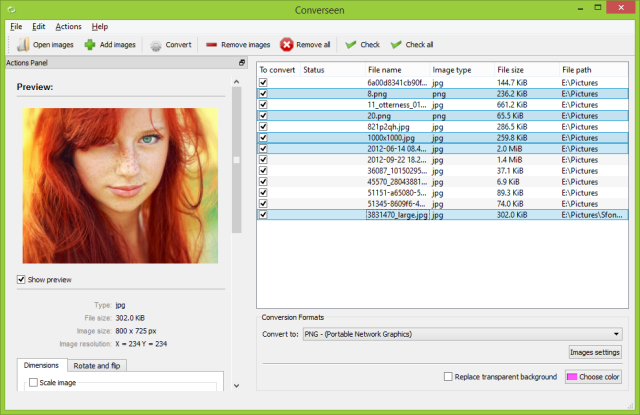
Converseen 0.15.2.0-1 has been released, offering users a robust and free cross-platform batch image processing tool. This software enables efficient management and manipulation of multiple images with just a single click, making it ideal for those who work with large image collections. The latest version maintains support for 32-bit systems, catering to a wider range of users.
One of Converseen's key features is its ability to convert entire PDF files into various image formats, which is beneficial for both personal and professional projects. With support for over 100 different image formats including commonly used types such as DPX, EXR, GIF, JPEG, JPEG-2000, PNG, SVG, TIFF, WebP, and HEIC/HEIF, users can easily customize and optimize images to meet specific requirements.
The user interface of Converseen is designed to be intuitive, making it accessible to even those who may not be particularly tech-savvy. The software boasts rapid processing speeds, which is advantageous for professionals seeking efficiency as well as for casual users needing quick conversions.
What sets Converseen apart is its commitment to maintaining exceptional image quality while preserving the integrity of the original files. It offers a comprehensive suite of features for resizing, rotating, flipping, and renaming images, making it a versatile solution for various image processing tasks.
Best of all, Converseen is completely free, providing an excellent resource for anyone looking to enhance their image workflow without incurring costs. Users are encouraged to experience the ease and efficiency of Converseen to elevate their image processing tasks today.
In addition to its core features, future updates could include enhanced cloud integration for seamless file management, advanced editing capabilities such as filters and effects, and improved batch automation features, further solidifying Converseen as an essential tool for both amateur and professional users alike
One of Converseen's key features is its ability to convert entire PDF files into various image formats, which is beneficial for both personal and professional projects. With support for over 100 different image formats including commonly used types such as DPX, EXR, GIF, JPEG, JPEG-2000, PNG, SVG, TIFF, WebP, and HEIC/HEIF, users can easily customize and optimize images to meet specific requirements.
The user interface of Converseen is designed to be intuitive, making it accessible to even those who may not be particularly tech-savvy. The software boasts rapid processing speeds, which is advantageous for professionals seeking efficiency as well as for casual users needing quick conversions.
What sets Converseen apart is its commitment to maintaining exceptional image quality while preserving the integrity of the original files. It offers a comprehensive suite of features for resizing, rotating, flipping, and renaming images, making it a versatile solution for various image processing tasks.
Best of all, Converseen is completely free, providing an excellent resource for anyone looking to enhance their image workflow without incurring costs. Users are encouraged to experience the ease and efficiency of Converseen to elevate their image processing tasks today.
In addition to its core features, future updates could include enhanced cloud integration for seamless file management, advanced editing capabilities such as filters and effects, and improved batch automation features, further solidifying Converseen as an essential tool for both amateur and professional users alike
Converseen 0.15.2.0-1 released
Converseen is a powerful and free, cross-platform batch image processing tool that allows users to efficiently manage and manipulate multiple images simultaneously with just a single click. 32-bit is also available.