The newly launched Content Hash Verifier 1.3 is designed to ensure the integrity of decrypted files that are stored on Blu-ray or Ultra HD discs. This tool checks the content hash of BD or UHD files, enabling users to detect any alterations to the raw M2TS files present on the disk.
Overview of Content Hash Verifier:
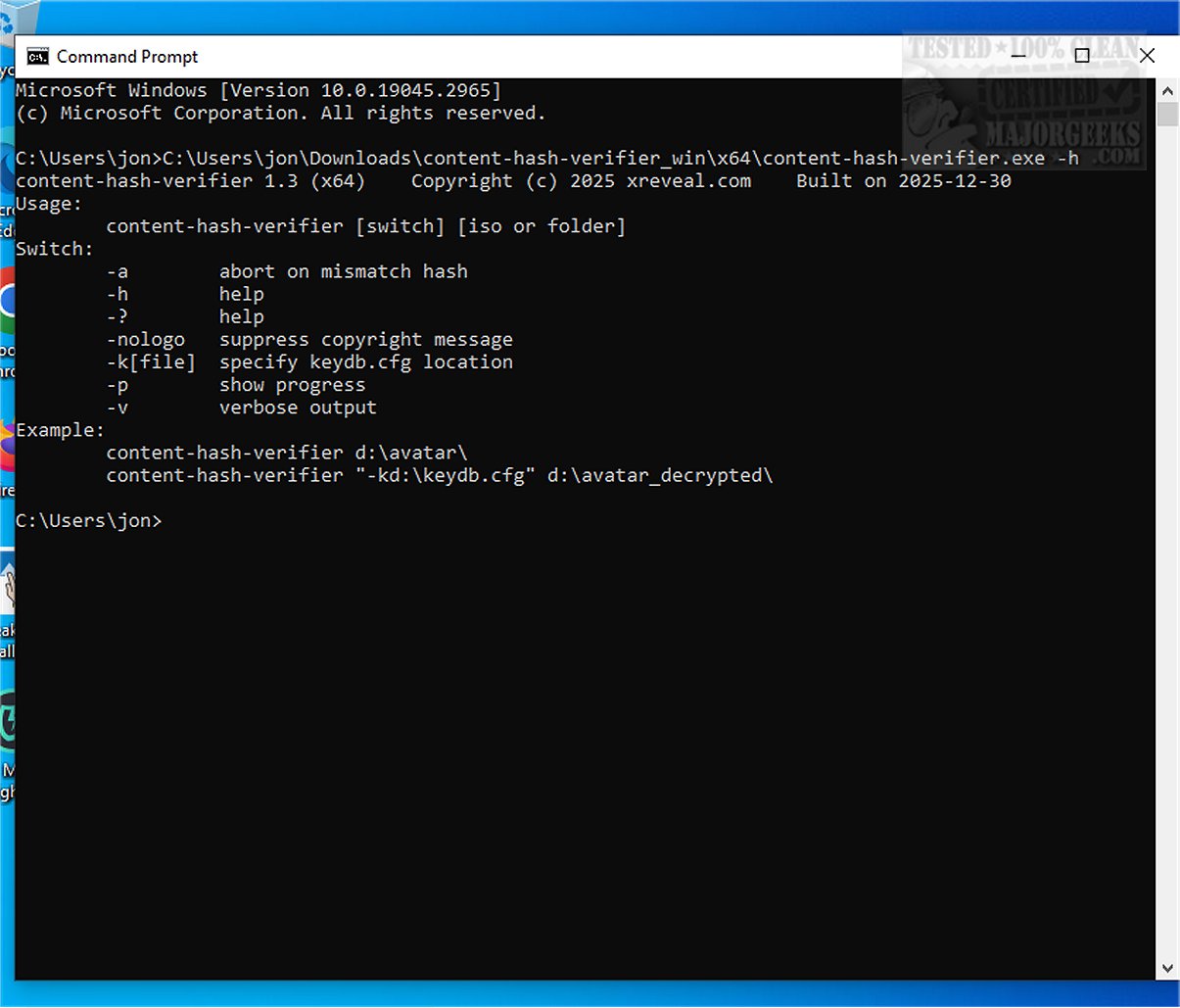
Content Hash Verifier operates through a Command Line interface, featuring a straightforward syntax and a limited set of options. This makes it accessible for users looking to verify file integrity without technical complications.
Usage Instructions:
To use Content Hash Verifier, simply execute the command:
- `-a`: Abort on hash mismatch
- `-h` or `-?`: Display help
- `-nologo`: Suppress copyright message
- `-k[file]`: Specify the location of keydb.cfg
- `-p`: Show progress
- `-v`: Provide verbose output
Example Command:
Key Features:
- Verification of content hash for ISO files, folders, and drives.
- A GUI version is available in Xreveal, which allows for drag-and-drop functionality.
- In cases where content hash verification fails, the tool checks the M2TS sync byte (0x47).
Using the GUI:
For users who prefer not to use the Command Line, the GUI can be accessed by right-clicking the Content Hash Verifier in the Xreveal tray menu. It attempts to restore AACS and CCI protection before performing content hash verification.
Raw File Evaluation:
The application calculates SHA-1 checksums for Blu-ray discs and SHA-256 checksums for UHD content, specifically evaluating raw files located in the `/BDMV/STREAM/*.m2ts` directory. It also provides a summary of the total files assessed, matched files, unmatched files, and the time taken for the verification.
Note: While the tool does not include a UDF parser, users can still verify the hash of an ISO file by providing the mounting path as a parameter.
Conclusion:
Content Hash Verifier is a vital tool for maintaining the integrity of decrypted files stored on Blu-ray and Ultra HD discs, helping users protect their valuable data.
Further Considerations:
As digital content continues to grow, having reliable tools like Content Hash Verifier will become increasingly crucial for data preservation and integrity verification. Users are encouraged to incorporate this tool into their digital security practices, ensuring their media collections remain unaltered and secure
Overview of Content Hash Verifier:
Content Hash Verifier operates through a Command Line interface, featuring a straightforward syntax and a limited set of options. This makes it accessible for users looking to verify file integrity without technical complications.
Usage Instructions:
To use Content Hash Verifier, simply execute the command:
content-hash-verifier [switch] [iso or folder]Here are some of the available switches:
- `-a`: Abort on hash mismatch
- `-h` or `-?`: Display help
- `-nologo`: Suppress copyright message
- `-k[file]`: Specify the location of keydb.cfg
- `-p`: Show progress
- `-v`: Provide verbose output
Example Command:
content-hash-verifier d:\avatar\The application will verify the disk's content hash, highlighting matches in green and mismatches in red for easy visualization.
content-hash-verifier "-kd:\keydb.cfg" d:\avatar_decrypted\
Key Features:
- Verification of content hash for ISO files, folders, and drives.
- A GUI version is available in Xreveal, which allows for drag-and-drop functionality.
- In cases where content hash verification fails, the tool checks the M2TS sync byte (0x47).
Using the GUI:
For users who prefer not to use the Command Line, the GUI can be accessed by right-clicking the Content Hash Verifier in the Xreveal tray menu. It attempts to restore AACS and CCI protection before performing content hash verification.
Raw File Evaluation:
The application calculates SHA-1 checksums for Blu-ray discs and SHA-256 checksums for UHD content, specifically evaluating raw files located in the `/BDMV/STREAM/*.m2ts` directory. It also provides a summary of the total files assessed, matched files, unmatched files, and the time taken for the verification.
Note: While the tool does not include a UDF parser, users can still verify the hash of an ISO file by providing the mounting path as a parameter.
Conclusion:
Content Hash Verifier is a vital tool for maintaining the integrity of decrypted files stored on Blu-ray and Ultra HD discs, helping users protect their valuable data.
Further Considerations:
As digital content continues to grow, having reliable tools like Content Hash Verifier will become increasingly crucial for data preservation and integrity verification. Users are encouraged to incorporate this tool into their digital security practices, ensuring their media collections remain unaltered and secure
Content Hash Verifier 1.3 released
Content Hash Verifier helps you ensure the integrity of decrypted files stored on Blu-ray or Ultra HD discs.