COM Port Info version 1.2.5 has been released, enhancing its capabilities to provide comprehensive details about COM ports on your machine. This utility is designed with a user-friendly interface that allows users to access essential information and management features related to COM ports.
With COM Port Info, users can view two different perspectives of the COM ports and their connection types (BusTypes). In addition to displaying critical data, the software enables users to safely remove hardware and restart devices, which is particularly useful after a "safe removal" process — this operation requires administrator privileges. Users can also change or swap COM port numbers, as well as perform USB port resets for systems running Windows XP, 8, and 10.
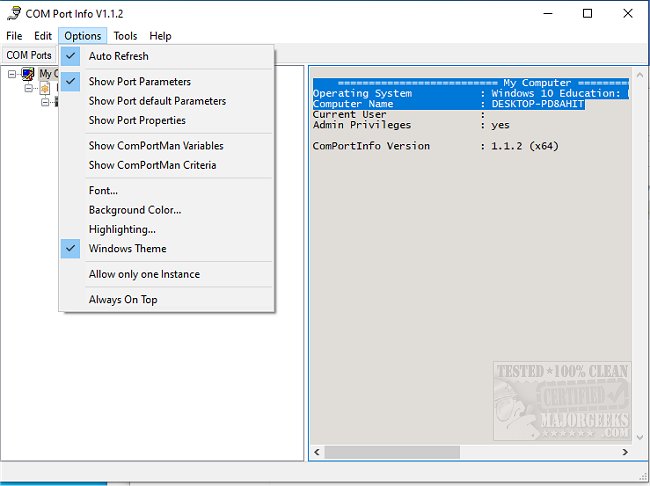
Furthermore, COM Port Info provides access to the Device Manager and Event Viewer, making it easier for users to manage and troubleshoot hardware issues. The software's features include displaying "Port Parameters" (using GetCommState) to show how the last application interacted with the port, "Default Port Parameters" (using GetDefaultCommConfig) that reflect settings from the Device Manager, and "Port Properties" (using GetCommProperties) that detail the capabilities of the COM port hardware, such as supported signals and data rates.
In summary, COM Port Info is a valuable tool for users looking to manage their COM port information efficiently. With its robust set of features, it simplifies the process of monitoring and configuring serial port settings, making it an essential utility for both casual users and professionals alike.
Future developments could include enhanced compatibility with newer operating systems, additional diagnostic tools for troubleshooting COM port issues, and more intuitive user interfaces to streamline the management process even further
With COM Port Info, users can view two different perspectives of the COM ports and their connection types (BusTypes). In addition to displaying critical data, the software enables users to safely remove hardware and restart devices, which is particularly useful after a "safe removal" process — this operation requires administrator privileges. Users can also change or swap COM port numbers, as well as perform USB port resets for systems running Windows XP, 8, and 10.
Furthermore, COM Port Info provides access to the Device Manager and Event Viewer, making it easier for users to manage and troubleshoot hardware issues. The software's features include displaying "Port Parameters" (using GetCommState) to show how the last application interacted with the port, "Default Port Parameters" (using GetDefaultCommConfig) that reflect settings from the Device Manager, and "Port Properties" (using GetCommProperties) that detail the capabilities of the COM port hardware, such as supported signals and data rates.
In summary, COM Port Info is a valuable tool for users looking to manage their COM port information efficiently. With its robust set of features, it simplifies the process of monitoring and configuring serial port settings, making it an essential utility for both casual users and professionals alike.
Future developments could include enhanced compatibility with newer operating systems, additional diagnostic tools for troubleshooting COM port issues, and more intuitive user interfaces to streamline the management process even further
COM Port Info 1.2.5 released
COM Port Info is designed to provide you with COM port details along with several management features.