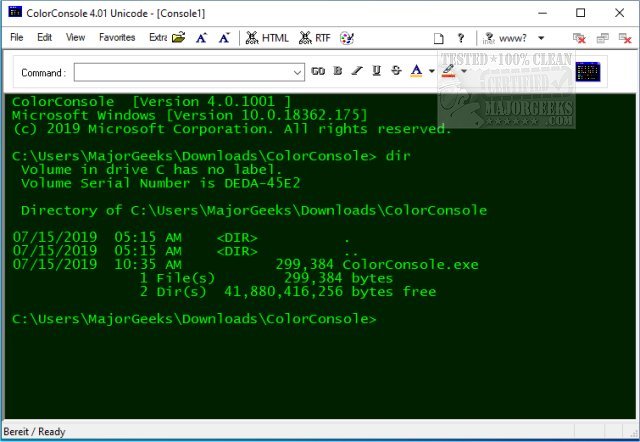
ColorConsole 7.44 has been released, offering enhanced functionality for users of cmd.exe and PowerShell by introducing color options and additional features to improve usability. This utility is particularly beneficial for individuals who have difficulty reading standard console screens, as it incorporates features such as copy, paste, cut, tabbed browsing, and easy export capabilities, all while presenting a vibrant interface.
ColorConsole is a portable application, meaning it can be easily extracted and used from any location on your computer, such as the desktop, without the need for formal installation. This flexibility allows users to quickly access a more visually appealing and efficient command prompt replacement, streamlining tasks and reducing the time spent on command line operations.
Key features of ColorConsole include:
- Access to favorite commands
- Exporting options to HTML and RTF formats
- Basic editing features like copy, paste, and cut
- Customizable font styles and colors
- Tabbed interface for managing multiple command windows
- Quick folder switching capabilities
- Fully portable design
In addition, users interested in further customizing their experience can explore guides on adjusting fonts, colors, and window sizes in PowerShell or Command Prompt, as well as comprehensive lists of commands for both interfaces.
Overall, ColorConsole serves as a powerful tool for enhancing command line interactions, making them more user-friendly and visually engaging
ColorConsole is a portable application, meaning it can be easily extracted and used from any location on your computer, such as the desktop, without the need for formal installation. This flexibility allows users to quickly access a more visually appealing and efficient command prompt replacement, streamlining tasks and reducing the time spent on command line operations.
Key features of ColorConsole include:
- Access to favorite commands
- Exporting options to HTML and RTF formats
- Basic editing features like copy, paste, and cut
- Customizable font styles and colors
- Tabbed interface for managing multiple command windows
- Quick folder switching capabilities
- Fully portable design
In addition, users interested in further customizing their experience can explore guides on adjusting fonts, colors, and window sizes in PowerShell or Command Prompt, as well as comprehensive lists of commands for both interfaces.
Overall, ColorConsole serves as a powerful tool for enhancing command line interactions, making them more user-friendly and visually engaging
ColorConsole 7.44 released
ColorConsole quite simply does what it says; it allows you to use (cmd.exe) and Powershell with colors and add additional features.