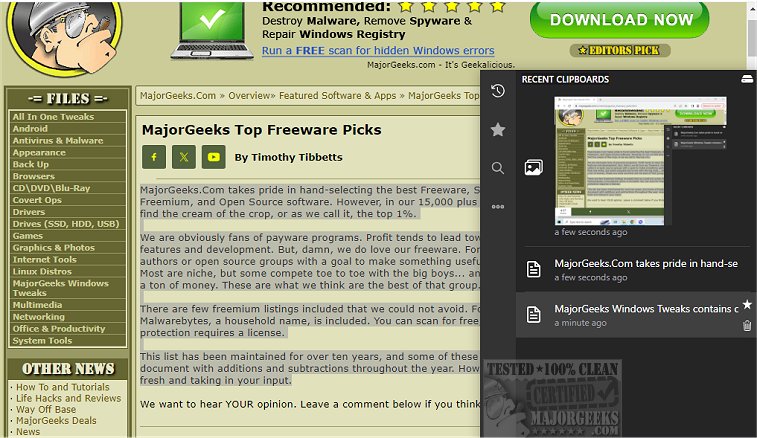
Clippy version 1.5.0 has been released, introducing an advanced clipboard manager that serves as a robust alternative to the default Windows clipboard functionality. This tool is specifically engineered to keep an organized record of all text and images copied by the user, making it easy to search and retrieve important items whenever necessary. Users can quickly access Clippy using a designated hotkey, which brings up the clipboard manager near the system tray for seamless navigation through clipboard content.
Clippy not only records every copying action but also ensures that all data is stored locally to uphold user privacy. Users have the ability to mark certain clipboard entries as favorites, enhancing the ease of access to frequently used items. Customization is a key feature of Clippy, allowing users to modify hotkeys to suit their preferences, facilitating rapid access to both recent and starred clipboard items.
Additional functionalities include cloud backup options and direct synchronization with cloud services, which can be managed from within the application. Clippy is designed to be user-friendly and comes packed with features that make it a powerful tool for anyone looking to enhance their clipboard management.
Key Features of Clippy include:
- Option to display or hide clipboard entries using customizable shortcuts.
- Ability to type out clipboard content even in scenarios where pasting is restricted (using ctrl+b).
- Support for both text and image data.
- Customizable keybinds for all functions.
- Capability to add favorites to clipboard items for easy retrieval.
- Smart search functionality for quick access to links, colors, images, and hex codes.
- Instant search features for rapid content location.
- Flexibility to change database storage locations and keyboard bindings.
- Dark and light mode options for user interface customization.
In conclusion, Clippy 1.5.0 stands out as a comprehensive and user-oriented clipboard manager that significantly improves the clipboard handling experience, making it an essential tool for productivity enthusiasts. As the demand for efficient data management continues to grow, tools like Clippy are increasingly valuable in providing users with effective solutions to streamline their workflows
Clippy not only records every copying action but also ensures that all data is stored locally to uphold user privacy. Users have the ability to mark certain clipboard entries as favorites, enhancing the ease of access to frequently used items. Customization is a key feature of Clippy, allowing users to modify hotkeys to suit their preferences, facilitating rapid access to both recent and starred clipboard items.
Additional functionalities include cloud backup options and direct synchronization with cloud services, which can be managed from within the application. Clippy is designed to be user-friendly and comes packed with features that make it a powerful tool for anyone looking to enhance their clipboard management.
Key Features of Clippy include:
- Option to display or hide clipboard entries using customizable shortcuts.
- Ability to type out clipboard content even in scenarios where pasting is restricted (using ctrl+b).
- Support for both text and image data.
- Customizable keybinds for all functions.
- Capability to add favorites to clipboard items for easy retrieval.
- Smart search functionality for quick access to links, colors, images, and hex codes.
- Instant search features for rapid content location.
- Flexibility to change database storage locations and keyboard bindings.
- Dark and light mode options for user interface customization.
In conclusion, Clippy 1.5.0 stands out as a comprehensive and user-oriented clipboard manager that significantly improves the clipboard handling experience, making it an essential tool for productivity enthusiasts. As the demand for efficient data management continues to grow, tools like Clippy are increasingly valuable in providing users with effective solutions to streamline their workflows
clippy 1.5.0 released
clippy provides a dedicated clipboard manager, a solid alternative to the default Windows manager.