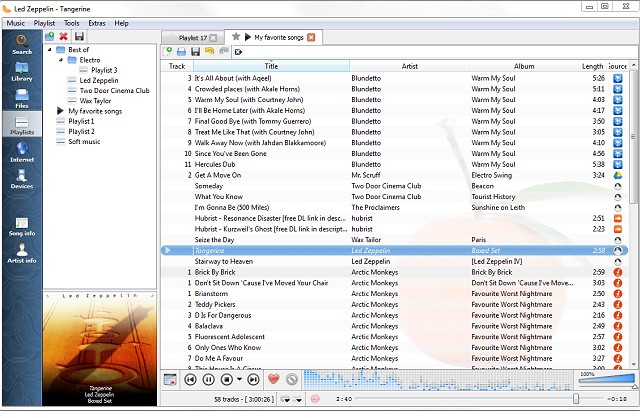
Clementine Music Player has recently released version 1.4.1-62, building upon its reputation as a versatile, multiplatform music player inspired by Amarok 1.4. The application is designed with a user-friendly interface that facilitates easy searching and playback of music.
The latest version introduces podcast support, allowing users to integrate and synchronize with gpodder.net, enhancing the overall audio experience. Additionally, users can now access music from Soundcloud and jazzradio.com through the Internet tab located in the sidebar, alongside songs they have uploaded to Google Drive. Another notable feature is the inclusion of mood bars that visually represent the music played from the local disk.
Key features of Clementine Music Player include:
- Searching and playing local music libraries.
- Streaming internet radio from various platforms, including Spotify, Grooveshark, and Last.fm.
- Creating smart and dynamic playlists.
- Support for tabbed playlists and the ability to import/export playlists in multiple formats (M3U, XSPF, PLS, ASX).
- Playing audio CDs and visualizations via projectM.
- Accessing lyrics, artist biographies, and photos.
- Music transcoding into various formats (MP3, Ogg Vorbis, FLAC, etc.).
- Tag editing and organization of music files, as well as fetching missing tags from MusicBrainz.
- Discovering and downloading podcasts, along with album cover art from Last.fm and Amazon.
- Cross-platform compatibility on Windows, macOS, and Linux, with native desktop notifications.
- Remote control capabilities using devices like the Wii Remote or via command-line.
- Music transfer functionality to iPods, iPhones, and other USB players.
As Clementine continues to evolve, it remains an excellent choice for music enthusiasts seeking a comprehensive and accessible music management solution.
Future updates could potentially further enhance user experience by integrating more streaming services, improving the podcast interface, or adding AI-driven playlist recommendations based on listening habits. Additionally, expanding mobile app functionalities could enhance accessibility for users on the go
The latest version introduces podcast support, allowing users to integrate and synchronize with gpodder.net, enhancing the overall audio experience. Additionally, users can now access music from Soundcloud and jazzradio.com through the Internet tab located in the sidebar, alongside songs they have uploaded to Google Drive. Another notable feature is the inclusion of mood bars that visually represent the music played from the local disk.
Key features of Clementine Music Player include:
- Searching and playing local music libraries.
- Streaming internet radio from various platforms, including Spotify, Grooveshark, and Last.fm.
- Creating smart and dynamic playlists.
- Support for tabbed playlists and the ability to import/export playlists in multiple formats (M3U, XSPF, PLS, ASX).
- Playing audio CDs and visualizations via projectM.
- Accessing lyrics, artist biographies, and photos.
- Music transcoding into various formats (MP3, Ogg Vorbis, FLAC, etc.).
- Tag editing and organization of music files, as well as fetching missing tags from MusicBrainz.
- Discovering and downloading podcasts, along with album cover art from Last.fm and Amazon.
- Cross-platform compatibility on Windows, macOS, and Linux, with native desktop notifications.
- Remote control capabilities using devices like the Wii Remote or via command-line.
- Music transfer functionality to iPods, iPhones, and other USB players.
As Clementine continues to evolve, it remains an excellent choice for music enthusiasts seeking a comprehensive and accessible music management solution.
Future updates could potentially further enhance user experience by integrating more streaming services, improving the podcast interface, or adding AI-driven playlist recommendations based on listening habits. Additionally, expanding mobile app functionalities could enhance accessibility for users on the go
Clementine Music Player 1.4.1-62 released
Clementine Music Player is a multiplatform music player inspired by Amarok 1.4. Its focus is on a fast and easy-to-use interface for searching and playing music.