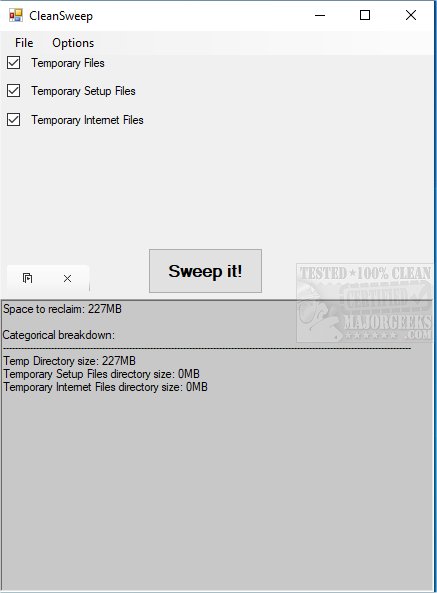
CleanSweep, a lightweight and portable application, has launched its 3.1.0 version, designed specifically to streamline the process of removing temporary files from your computer. Unlike broader cleaning tools that tackle a wide array of data, CleanSweep focuses solely on temporary files, setup files, and internet files, which allows for a more efficient and quicker cleaning experience.
To use CleanSweep, you simply need to unpack it using a tool like 7-Zip. Once opened, the application presents a list of potential items for cleaning, categorized for your convenience. Users can select which items to remove by checking the corresponding boxes. After making your selections, you can initiate the cleaning process by clicking the "Sweep It!" button. CleanSweep then provides a summary of the items successfully removed, giving users immediate feedback on the cleaning operation.
This focused approach makes CleanSweep an excellent option for those looking for a straightforward solution to manage temporary files without the added complexity often found in more comprehensive cleaning applications. Its portable nature adds to its appeal, allowing users to run it from a USB drive or any other portable storage device.
In addition to CleanSweep, users interested in maintaining their system's performance might also explore tools like Storage Sense for automatic junk file deletion in Windows 10 and 11, or compare alternatives such as CCleaner, Wise Disk Cleaner, and PrivaZer for more extensive disk cleaning options. Furthermore, resources are available for managing specific system folders like Windows.old and $Windows.~Bt, helping users optimize their storage effectively.
As the digital landscape continues to evolve, tools like CleanSweep represent a necessary component in maintaining system performance and efficiency, catering to users who prioritize simplicity and functionality in their software choices
To use CleanSweep, you simply need to unpack it using a tool like 7-Zip. Once opened, the application presents a list of potential items for cleaning, categorized for your convenience. Users can select which items to remove by checking the corresponding boxes. After making your selections, you can initiate the cleaning process by clicking the "Sweep It!" button. CleanSweep then provides a summary of the items successfully removed, giving users immediate feedback on the cleaning operation.
This focused approach makes CleanSweep an excellent option for those looking for a straightforward solution to manage temporary files without the added complexity often found in more comprehensive cleaning applications. Its portable nature adds to its appeal, allowing users to run it from a USB drive or any other portable storage device.
In addition to CleanSweep, users interested in maintaining their system's performance might also explore tools like Storage Sense for automatic junk file deletion in Windows 10 and 11, or compare alternatives such as CCleaner, Wise Disk Cleaner, and PrivaZer for more extensive disk cleaning options. Furthermore, resources are available for managing specific system folders like Windows.old and $Windows.~Bt, helping users optimize their storage effectively.
As the digital landscape continues to evolve, tools like CleanSweep represent a necessary component in maintaining system performance and efficiency, catering to users who prioritize simplicity and functionality in their software choices
CleanSweep 3.1.0 released
CleanSweep is a small portable tool for removing various temporary files from your machine.