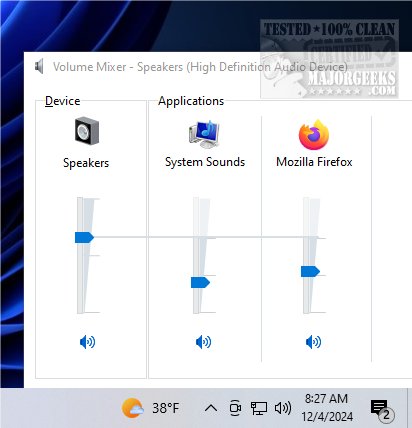
ClassicMixer 2.6 has been released, offering users a return to the traditional volume mixer interface on Windows 11. This application simplifies the management of audio levels for individual applications, catering to users who prefer a more classic and intuitive design for their sound settings. With ClassicMixer, users can efficiently control the volume of each program running on their computer, thus enhancing their overall audio experience.
One of the standout features of ClassicMixer is its compatibility with all screen resolutions and sizes. It is optimized for 4K displays, ensuring high clarity and detail, but users can also adjust the width and height settings to suit their specific screen resolutions. This adaptability makes ClassicMixer a versatile tool for a variety of devices, from high-definition monitors to standard displays and mobile devices.
While ClassicMixer does not include a dedicated settings window, users can easily set it to launch automatically at startup using the Task Scheduler. To do this, users can create a basic task in the Task Scheduler, provide a name and description, set the trigger to "At log on," and select ClassicMixer as the program to start. This feature ensures that ClassicMixer is readily available whenever the user logs into their account.
ClassicMixer enables seamless switching between sound sources, allowing for precise control over the audio experience. Its user-friendly interface permits individual volume adjustments for different programs, ensuring that music, videos, and voice calls are tailored to personal preferences.
In summary, ClassicMixer is an essential tool for Windows 11 users who value a classic approach to audio management. By providing an intuitive interface and flexible features, it empowers users to achieve the perfect sound balance for their activities.
Looking ahead, future updates could introduce enhanced features such as customizable presets for audio configurations, advanced equalizer settings for more precise audio control, and better integration with third-party applications for a more cohesive audio experience. Additionally, expanding support for other operating systems could attract a broader user base seeking similar functionality
One of the standout features of ClassicMixer is its compatibility with all screen resolutions and sizes. It is optimized for 4K displays, ensuring high clarity and detail, but users can also adjust the width and height settings to suit their specific screen resolutions. This adaptability makes ClassicMixer a versatile tool for a variety of devices, from high-definition monitors to standard displays and mobile devices.
While ClassicMixer does not include a dedicated settings window, users can easily set it to launch automatically at startup using the Task Scheduler. To do this, users can create a basic task in the Task Scheduler, provide a name and description, set the trigger to "At log on," and select ClassicMixer as the program to start. This feature ensures that ClassicMixer is readily available whenever the user logs into their account.
ClassicMixer enables seamless switching between sound sources, allowing for precise control over the audio experience. Its user-friendly interface permits individual volume adjustments for different programs, ensuring that music, videos, and voice calls are tailored to personal preferences.
In summary, ClassicMixer is an essential tool for Windows 11 users who value a classic approach to audio management. By providing an intuitive interface and flexible features, it empowers users to achieve the perfect sound balance for their activities.
Looking ahead, future updates could introduce enhanced features such as customizable presets for audio configurations, advanced equalizer settings for more precise audio control, and better integration with third-party applications for a more cohesive audio experience. Additionally, expanding support for other operating systems could attract a broader user base seeking similar functionality
ClassicMixer 2.6 released
ClassicMixer brings back the traditional volume mixer interface on Windows 11, allowing you to easily manage audio levels for individual applications.