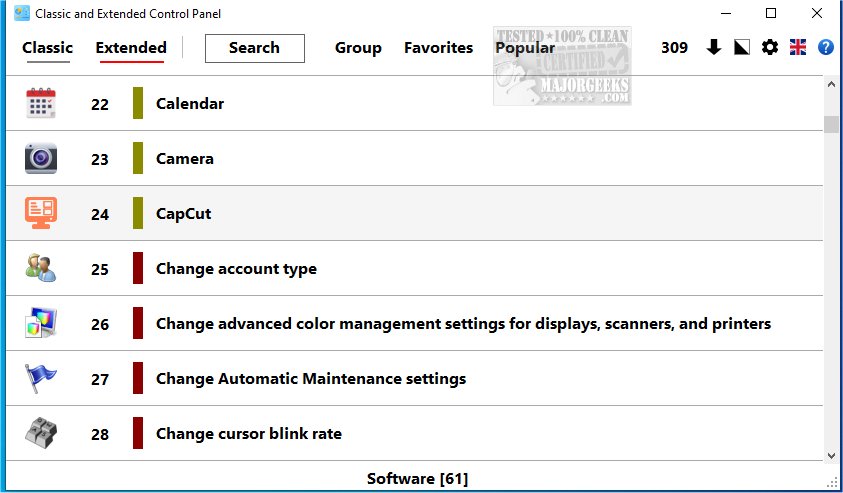
The Classic and Extended Control Panel 1.0.0.9 has been released, aimed at combining the simplicity of the traditional Control Panel with an array of modern features. This software is particularly useful as Microsoft phases out the traditional Control Panel in favor of the new "Settings" application, which has proven difficult for some users to navigate.
The Classic and Extended Control Panel provides a user-friendly interface that retains all the functionalities of the original Control Panel while offering additional features to enhance usability. Users can switch between "Classic" and "Extended" modes, tailoring their experience to their preferences. The Extended mode significantly expands configuration options, granting access to advanced tools such as Administrative Tools and "GodMode," which consolidates all control panel settings into a single folder for easier management.
One of the key benefits of this control panel is its unified layout, which organizes all system settings within a single interface, making navigation straightforward and efficient. The powerful search function helps users quickly locate specific options, while the structured menu ensures that all critical settings are easily reachable.
In conclusion, the Classic and Extended Control Panel is an excellent choice for users who appreciate the traditional Control Panel's features but desire a more extensive range of configuration options. Its operation as a standalone application guarantees functionality regardless of Microsoft's changes to the built-in Control Panel, making it a reliable tool for users seeking both familiarity and enhanced control over their system settings. This blend of tradition and innovation empowers users to manage their digital environment more effectively.
Extension: Furthermore, as technology continues to evolve, the need for adaptable and user-centric interfaces becomes increasingly crucial. The Classic and Extended Control Panel not only meets this need but also encourages users to explore advanced system configurations they may not have considered before. Future updates could potentially introduce even more features, such as integration with third-party applications, improved customization options, and enhanced security settings, making it an even more indispensable tool for users looking to optimize their system management experience
The Classic and Extended Control Panel provides a user-friendly interface that retains all the functionalities of the original Control Panel while offering additional features to enhance usability. Users can switch between "Classic" and "Extended" modes, tailoring their experience to their preferences. The Extended mode significantly expands configuration options, granting access to advanced tools such as Administrative Tools and "GodMode," which consolidates all control panel settings into a single folder for easier management.
One of the key benefits of this control panel is its unified layout, which organizes all system settings within a single interface, making navigation straightforward and efficient. The powerful search function helps users quickly locate specific options, while the structured menu ensures that all critical settings are easily reachable.
In conclusion, the Classic and Extended Control Panel is an excellent choice for users who appreciate the traditional Control Panel's features but desire a more extensive range of configuration options. Its operation as a standalone application guarantees functionality regardless of Microsoft's changes to the built-in Control Panel, making it a reliable tool for users seeking both familiarity and enhanced control over their system settings. This blend of tradition and innovation empowers users to manage their digital environment more effectively.
Extension: Furthermore, as technology continues to evolve, the need for adaptable and user-centric interfaces becomes increasingly crucial. The Classic and Extended Control Panel not only meets this need but also encourages users to explore advanced system configurations they may not have considered before. Future updates could potentially introduce even more features, such as integration with third-party applications, improved customization options, and enhanced security settings, making it an even more indispensable tool for users looking to optimize their system management experience
Classic and Extended Control Panel 1.0.0.9 released
Classic and Extended Control Panel is designed to maintain the straightforwardness of the traditional Control Panel while incorporating a variety of new features
Classic and Extended Control Panel 1.0.0.9 released @ MajorGeeks