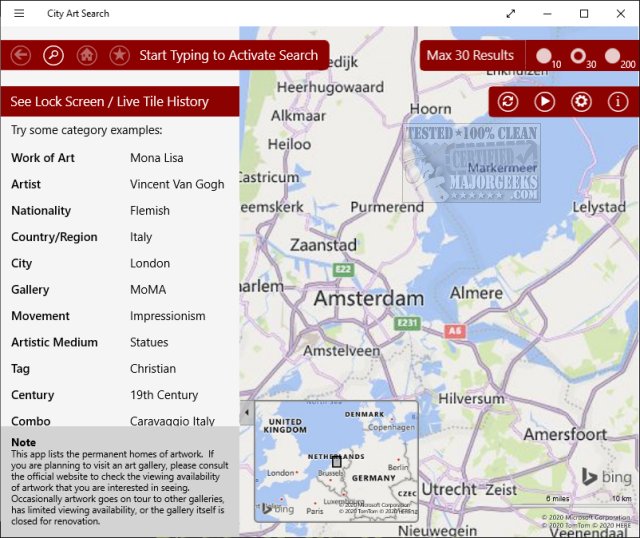
The City Art Search app, version 8.0.8.0, has been released, allowing users to enhance their Windows 10 lock screen with stunning high-resolution artworks. With access to over 9,500 renowned paintings, sculptures, and architectural marvels from around the globe, users can personalize their screens with new art every hour or day. The app makes it easy to explore favorite artists’ masterpieces or discover essential artworks in cities you plan to visit.
Upon installation, City Art Search prompts users to update their artwork periodically. In addition to browsing for specific pieces, the app features an interactive world map that allows users to drag and zoom to explore various locations. After selecting a piece, users can access Wikipedia information, download images, mark favorites, or add artworks to their Live Tiles for quick access.
City Art Search is an excellent tool for art enthusiasts to virtually explore and revisit significant cultural sites from the comfort of their Windows 10 desktop.
To further enhance your experience, consider customizing your desktop settings. For example, learn how to toggle the desktop background image on or off, add color to your Start menu and taskbar, or incorporate emojis into your communications. Additionally, you can manage thumbnail previews in File Explorer to suit your preferences. Overall, City Art Search not only beautifies your desktop but also encourages cultural exploration and appreciation
Upon installation, City Art Search prompts users to update their artwork periodically. In addition to browsing for specific pieces, the app features an interactive world map that allows users to drag and zoom to explore various locations. After selecting a piece, users can access Wikipedia information, download images, mark favorites, or add artworks to their Live Tiles for quick access.
City Art Search is an excellent tool for art enthusiasts to virtually explore and revisit significant cultural sites from the comfort of their Windows 10 desktop.
To further enhance your experience, consider customizing your desktop settings. For example, learn how to toggle the desktop background image on or off, add color to your Start menu and taskbar, or incorporate emojis into your communications. Additionally, you can manage thumbnail previews in File Explorer to suit your preferences. Overall, City Art Search not only beautifies your desktop but also encourages cultural exploration and appreciation
City Art Search 8.0.8.0 released
City Art Search can personalize your Windows 10 lock screen with beautiful, high-resolution artworks every hour or every day. Search over 9,500 famous paintings, sculptures, and architectural wonders worldwide.